
Get paid on time, without the chasing.
Invoicing and payments built for coaching businesses. Bill a whole class in one go, let families pay online through Stripe, and leave the follow-ups to automatic reminders.
Your cash flow shouldn’t depend on parents remembering.
Most coaching businesses lose hours every week building invoices in spreadsheets and texting families about overdue fees. Outcoach does the billing and the chasing, so you can get back to coaching.
- Build each invoice in Word or Excel
- Copy every family’s details in by hand
- Email the invoices one at a time
- Match bank transfers against a spreadsheet
- Text the families who haven’t paid yet
- Find out a student has trained for weeks unpaid
Six jobs, four apps and an awkward chat at pickup.
Pick the class. Check the invoices. Send. Reminders handle the rest.
- A whole class invoiced in one go
- Family details filled in for you
- Families pay online, straight to your bank
- Paid, open and overdue, always up to date
Six screens that replace your invoicing spreadsheet.
Invoicing, payment collection, reminders and recurring billing, all connected. Here’s what you’ll use from the first invoice of term to the last reminder.
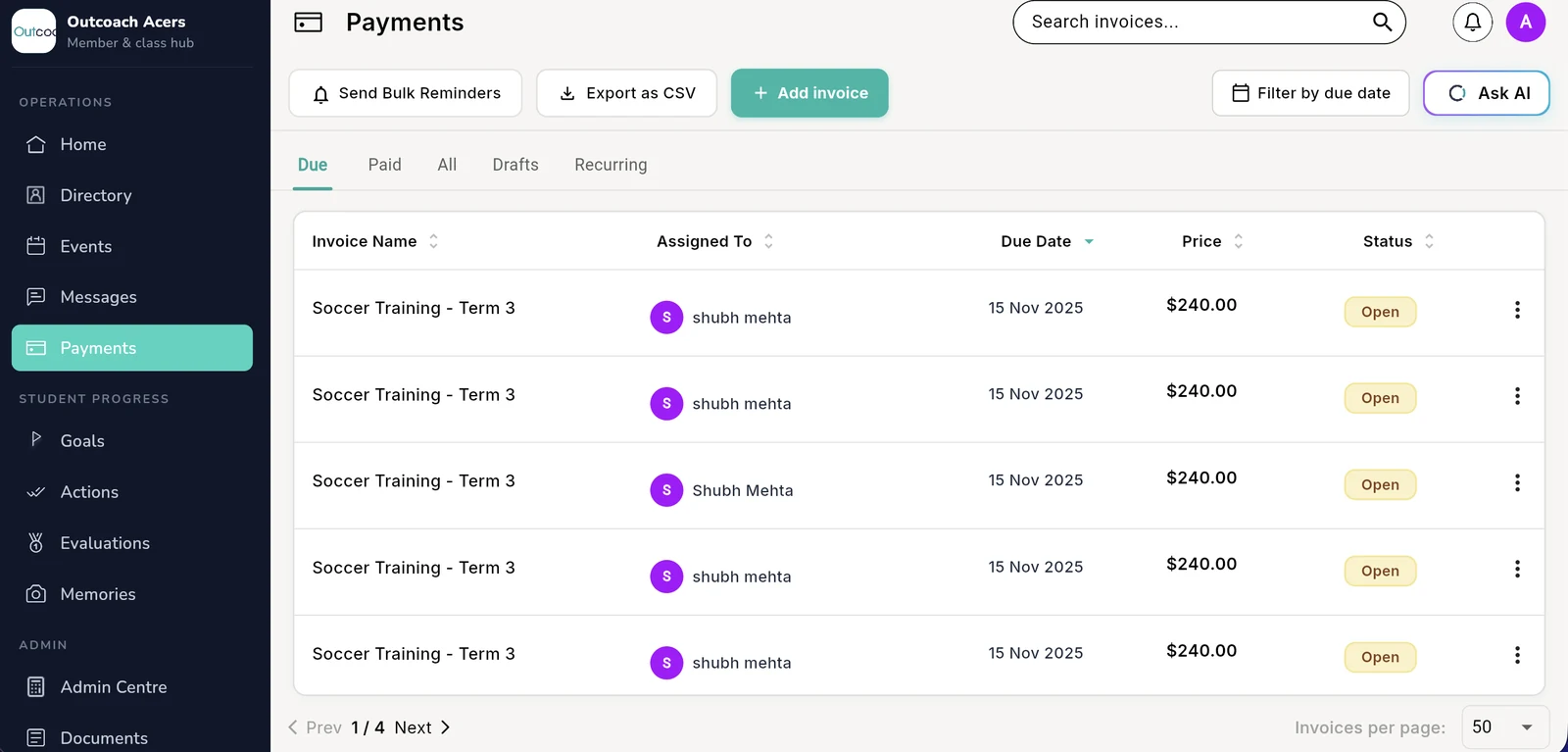
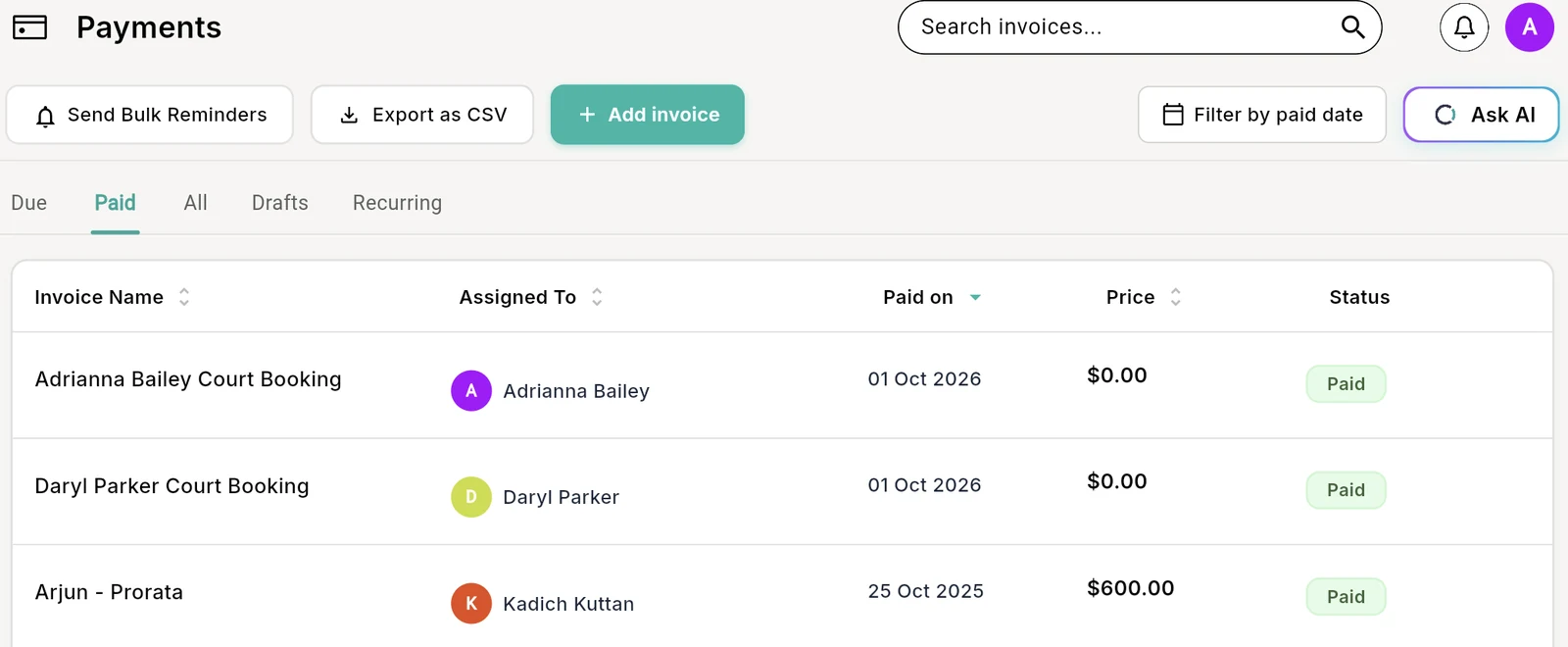
See who’s paid and who hasn’t, at a glance.
Every invoice, payment and outstanding balance in one place. No spreadsheets and no guessing, just a clear picture of what’s owed at any moment.
- 1Due, paid, all, drafts and recurringJump straight to the invoices you need to deal with.
- 2Filter by due date or paid dateCheck this week, this month or the whole term.
- 3Export as CSVHand it to your accountant or load it into your accounting software.
- 4Status on every invoiceOpen, paid or overdue, updated as families pay.
 1
2
3
4
1
2
3
4
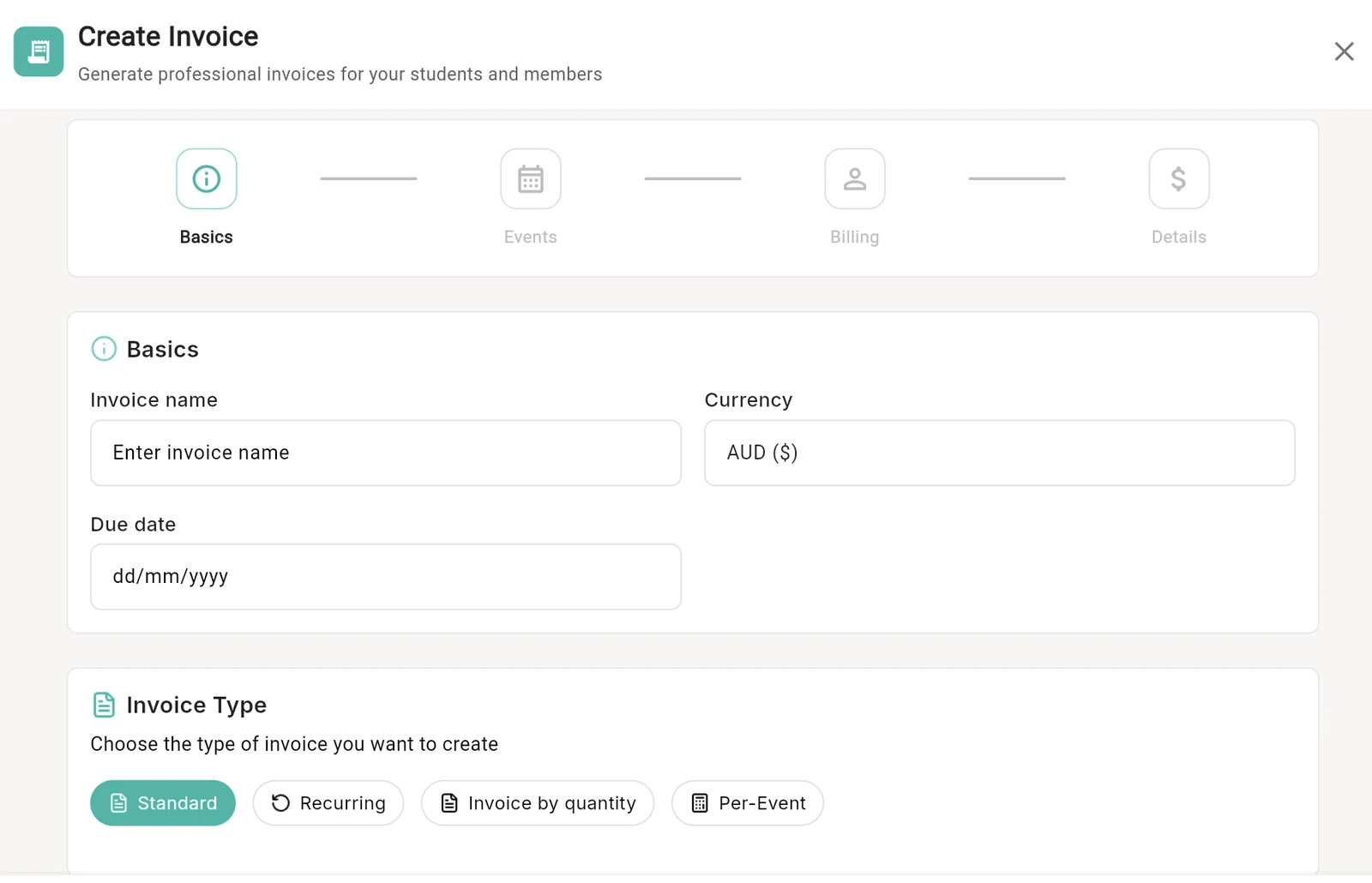
Four ways to bill, depending on how you charge.
A one-off fee, a weekly class, a pack of lessons or a charge per session. Pick the invoice type and Outcoach walks you through the rest in four short steps.
- 1Standard, recurring, by quantity or per eventOne tool for every way you price your coaching.
- 2Basics, events, billing, detailsA guided setup, so nothing gets missed.
- 3Bill in the right currencySet the currency on each invoice, from AUD to SGD.
- 4Set the due date up frontReminders work from it, so you don’t have to.
 1
2
3
4
1
2
3
4
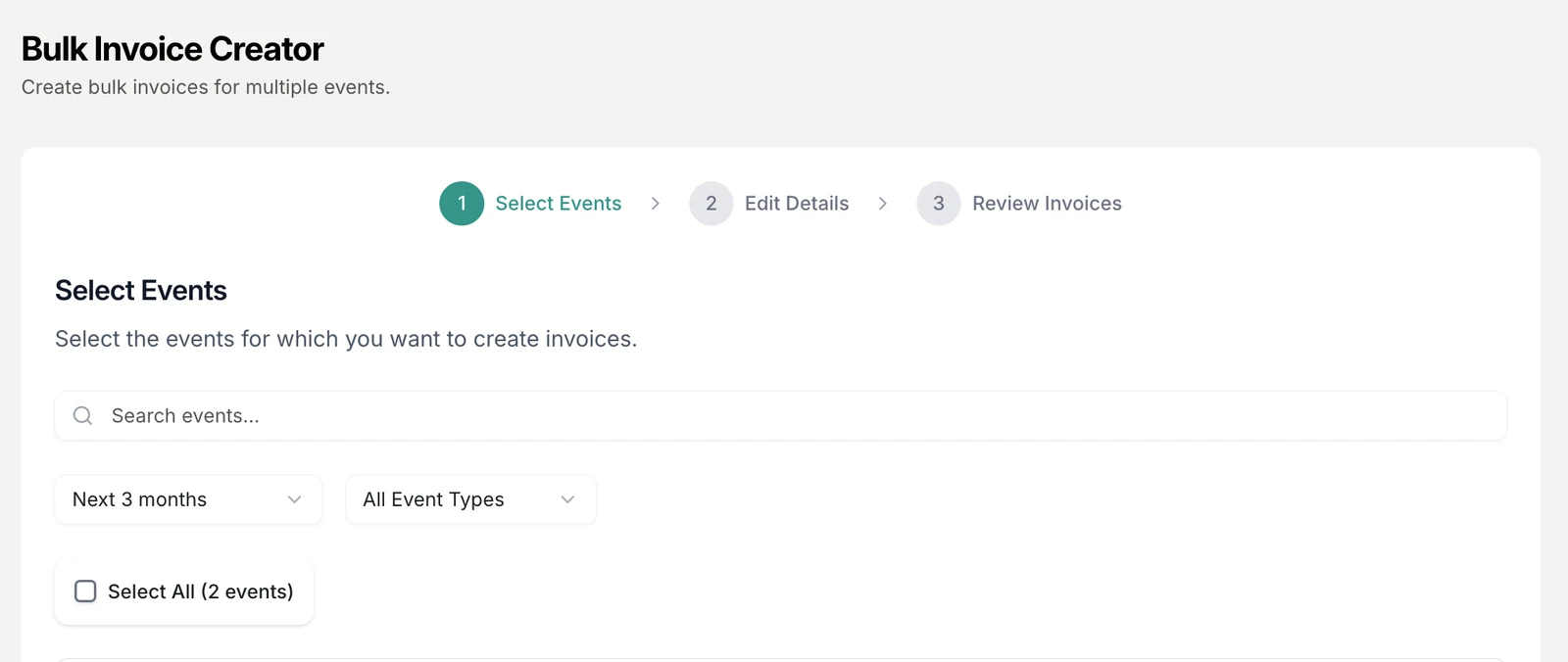
Invoice a whole program in three steps.
Pick the classes, set the details once and check every invoice before it goes. Each family gets a clean PDF invoice in their inbox, with their details already filled in.
- 1Find the classes to billFilter by the next few months and by event type.
- 2Select them all in one tickEvery enrolled student is included automatically.
- 3Edit the details onceName, amount and due date apply to every invoice.
- 4Review, then sendSee every invoice before a single one goes out.
 1
2
3
4
1
2
3
4
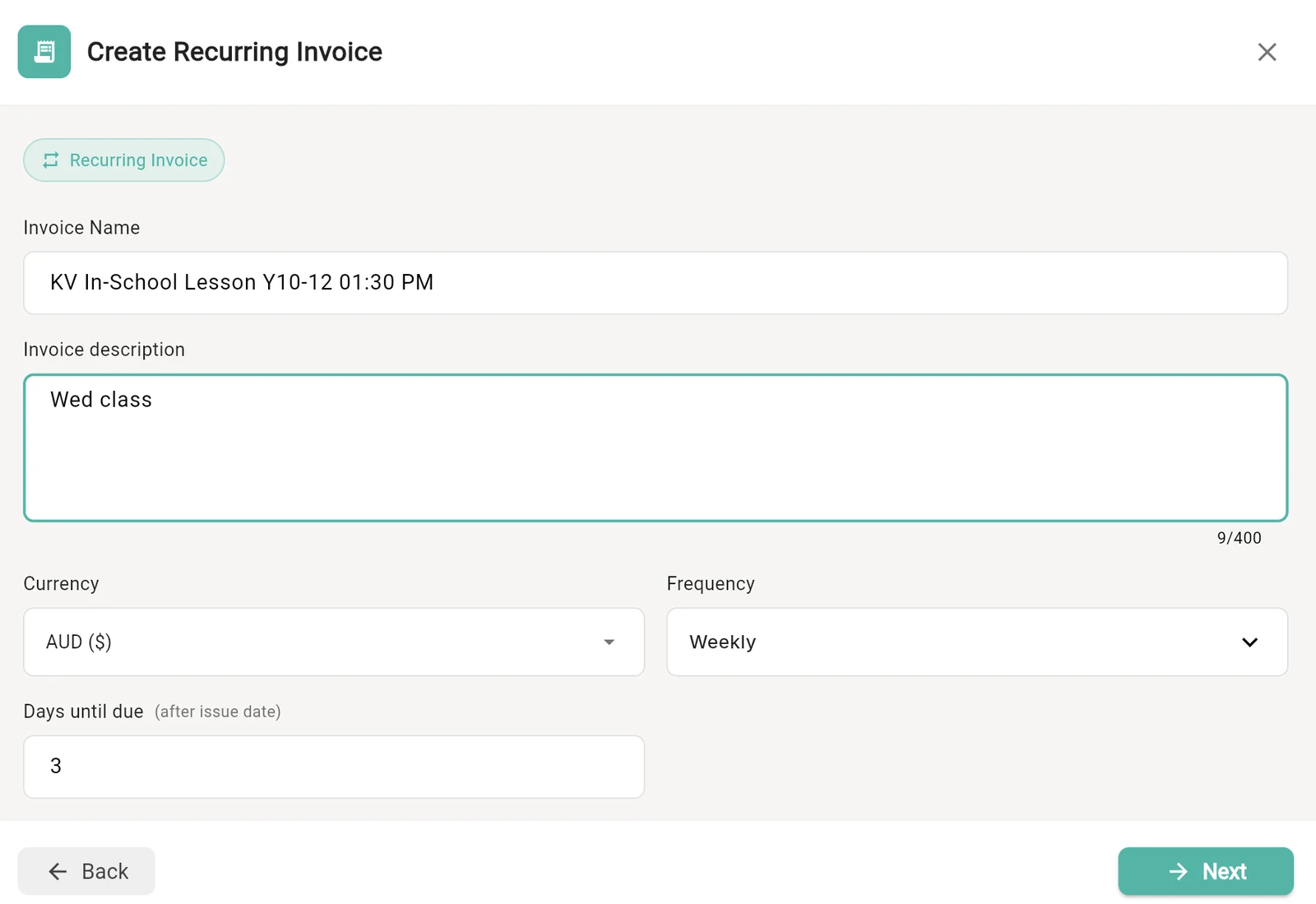
Set it up once. It bills on schedule, every time.
For weekly lessons, ongoing squads and memberships, create a recurring invoice and Outcoach issues the next one for you. Payments keep coming in without anyone remembering to send them.
- 1Choose how often it billsWeekly, or whatever cycle suits your program.
- 2Give families time to paySet how many days after issue each invoice is due.
- 3Name it so families know what it’s forAdd the class, day and time in the description.
- 4Any currency you bill inSet once for the whole series.
 1
2
3
4
1
2
3
4
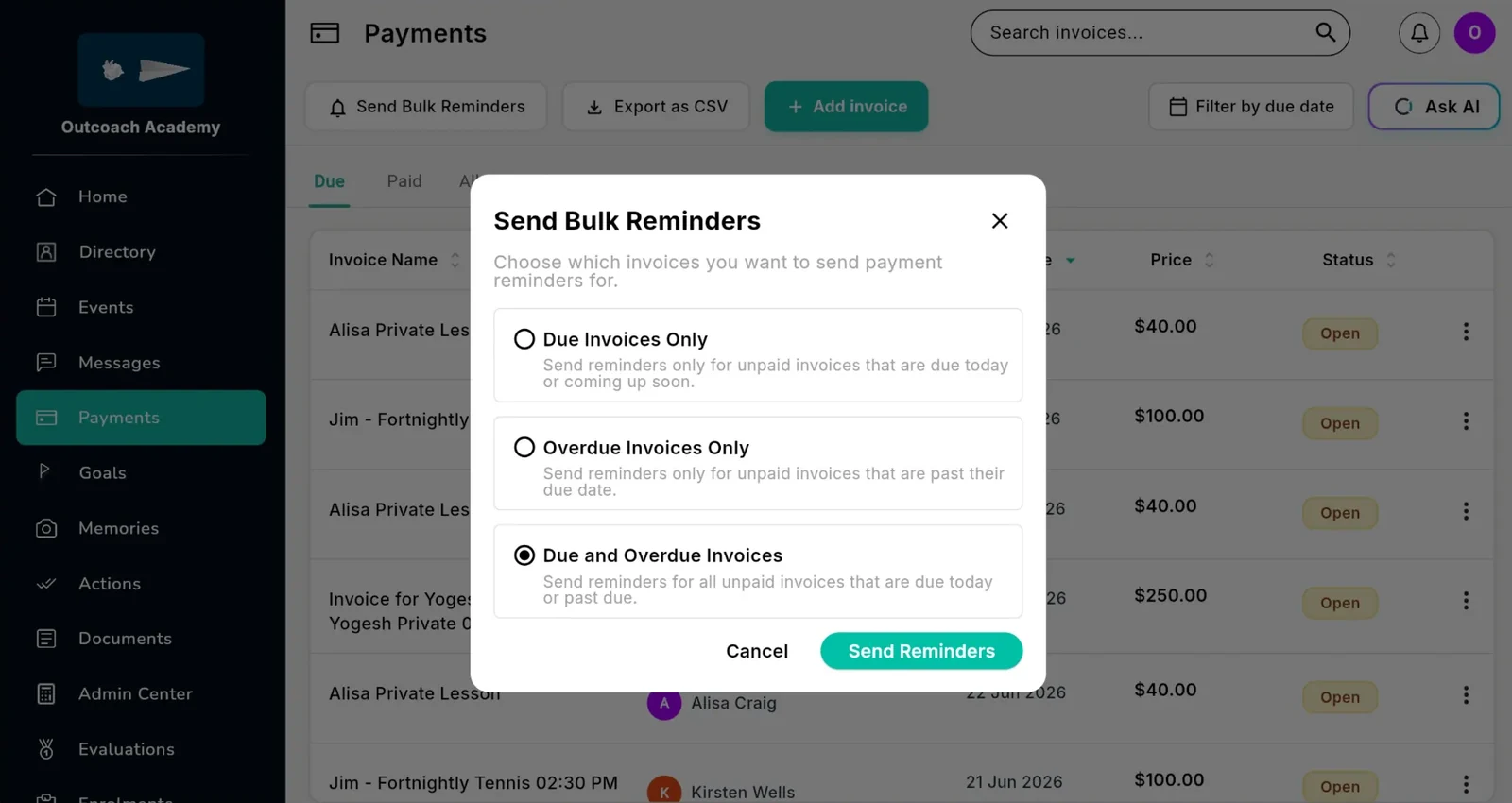
Automatic reminders. Zero awkward conversations.
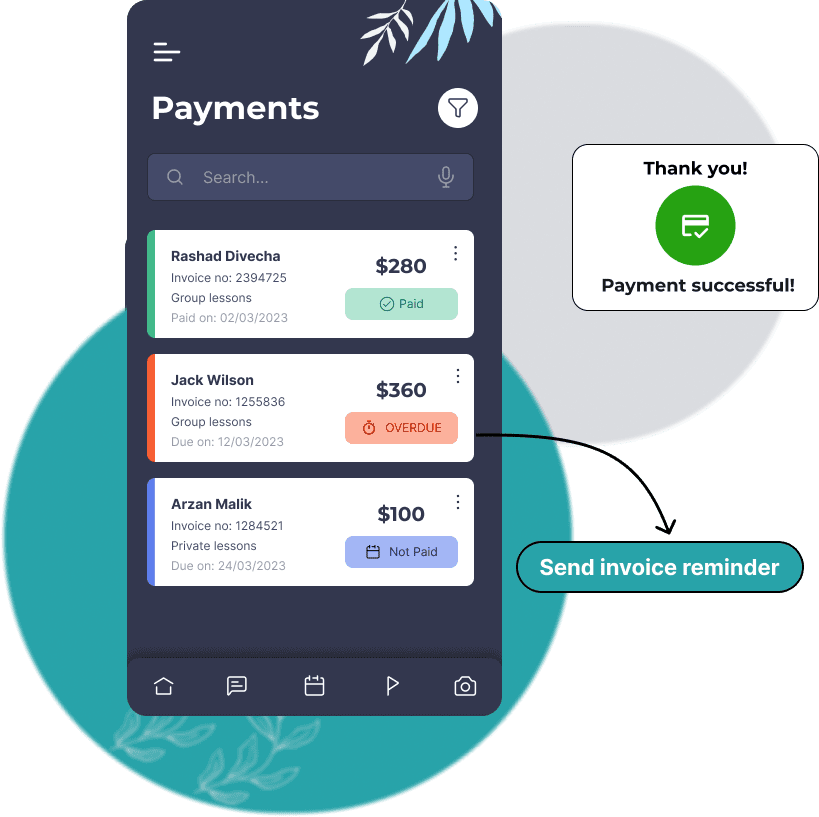
Outcoach sends payment reminders before and after the due date, so you get paid on time without a single awkward message. Need to nudge everyone at once? Send bulk reminders in two clicks.
- 1Send Bulk RemindersOne button for every unpaid invoice.
- 2Due, overdue, or bothRemind families before the due date, after it, or all at once.
- 3Every reminder carries a pay linkFamilies pay right from the message.
- 4No more training for weeks unpaidOverdue invoices stand out the moment they slip.
 1
2
3
4
1
2
3
4
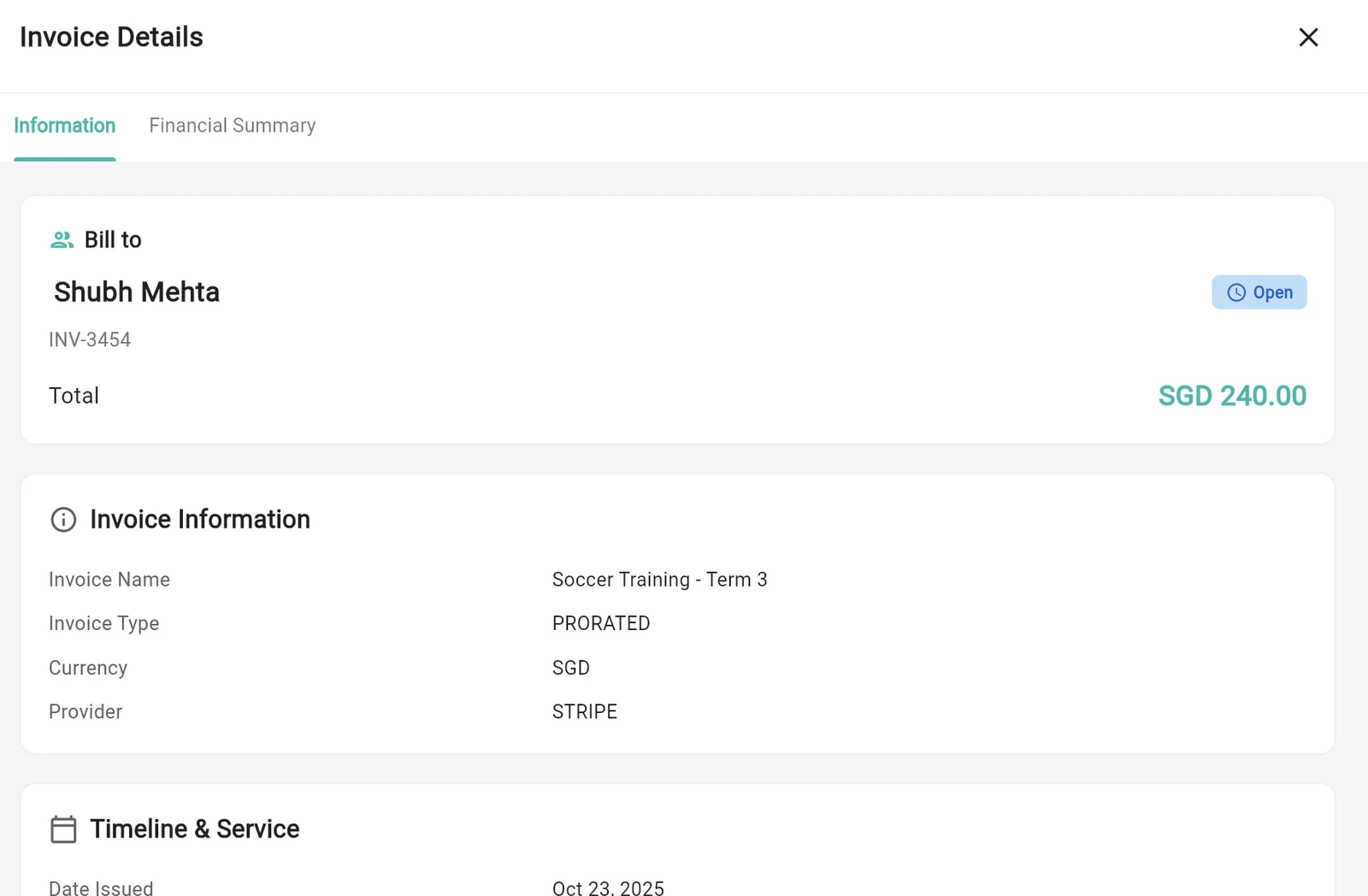
Every invoice, with the full story behind it.
Open any invoice to see who it’s for, what it covers, how it was paid and when. Every invoice for every student stays on record, so a dispute takes seconds to settle.
- 1Live statusOpen, paid or overdue, right at the top.
- 2Prorated for late joinersBill only for the classes that are left in term.
- 3Paid through StripeSee the provider and currency on every invoice.
- 4Financial summaryWhat was charged, what’s been paid and what’s left.
 1
2
3
4
1
2
3
4
Know exactly what’s owed, any day of the term.
See what you’ve collected, what’s still outstanding and what’s coming in next. End-of-term reconciliation takes minutes, not a weekend.
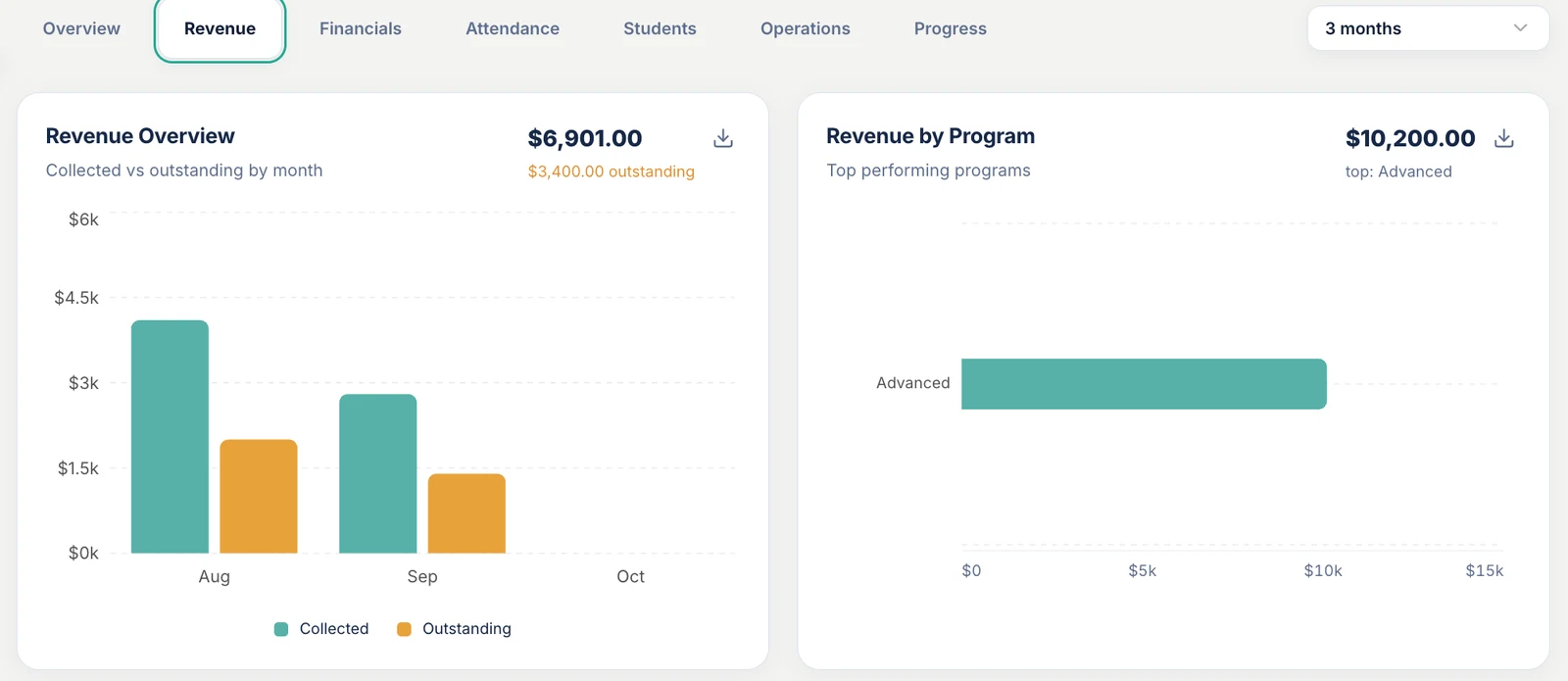
Collected versus outstanding, month by month.
A clear view of how much has come in and how much is still owed, plus which programs bring in the most.
- 1Collected and outstanding by monthSpot a slow month before it hurts cash flow.
- 2Revenue by programSee which programs are your top performers.
- 3Download any reportTake the numbers into your end-of-term reconciliation.
- 4Pick the time rangeLook back over the last few months or longer.
 1
2
3
4
1
2
3
4
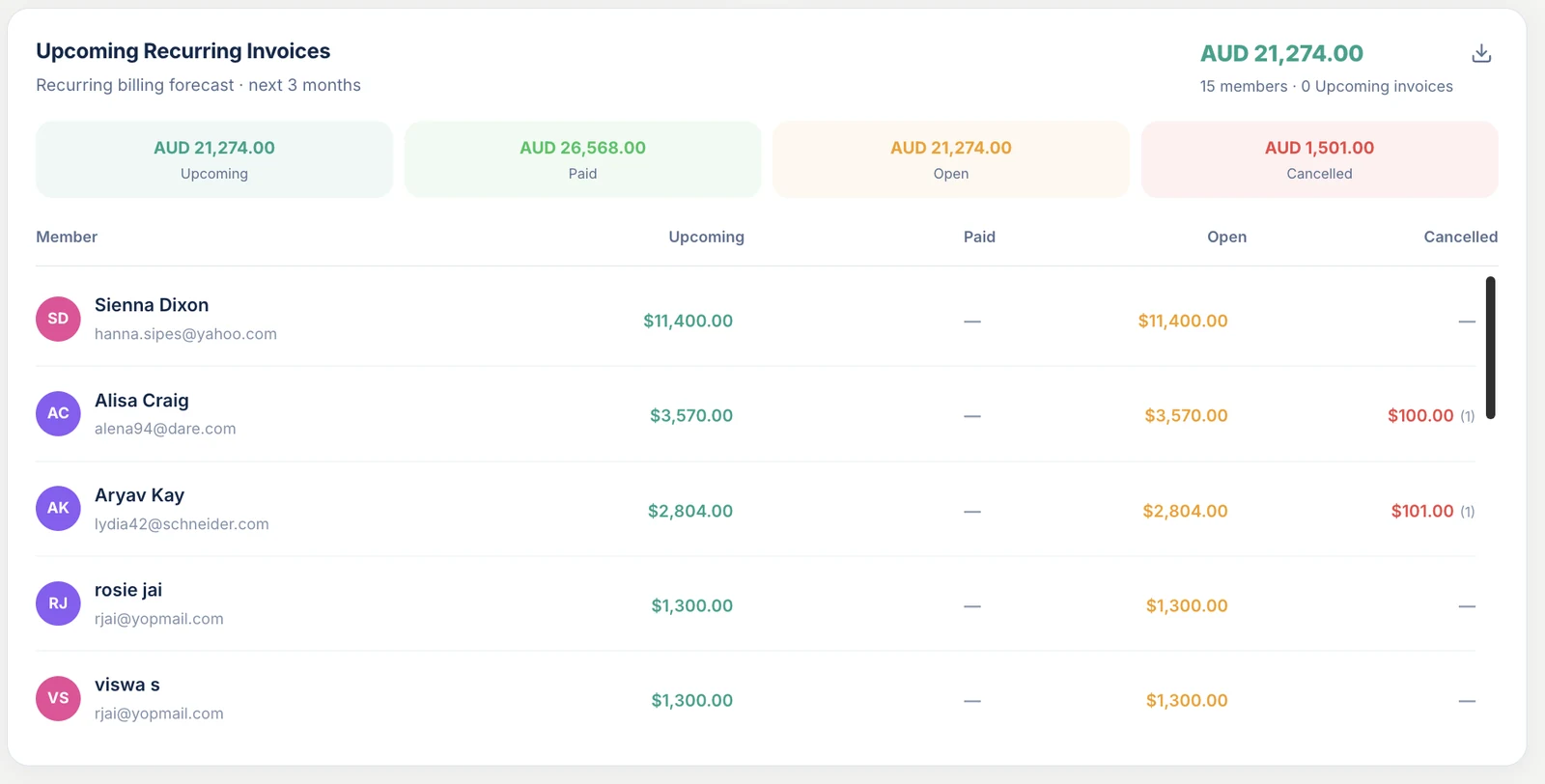
See the next three months of recurring billing.
Every recurring invoice coming up, member by member, so you can plan ahead with real numbers instead of hope.
- Upcoming, paid, open and cancelledFour totals across the top, updated as families pay.
- A line for every memberSee exactly who owes what over the next three months.
- Cash flow you can count onNot dependent on anyone’s memory.
Every way your families want to pay.
Give parents options and you’ll get paid faster. Card, bank transfer or payment at booking, all tracked in one place.
Card payments through Stripe
Families pay online, securely, and the money goes straight to your bank account.
Bank transfer
Offer bank transfer to the parents who prefer it, and keep it all on one record.
PDF invoices, emailed for you
Every family gets a clean, professional invoice in their inbox.
Automatic reminders
Reminders go out before and after the due date, without you lifting a finger.
Prorated invoices
Someone joins halfway through term? Bill them for the classes that are left.
Drafts
Start an invoice now and send it when you’re ready. Drafts wait in their own tab.
Bill in your currency
Choose the currency on each invoice, from Australian to Singapore dollars.
Invoice history per student
Every invoice sent, paid or outstanding for each student. Dispute-proof records.
Export as CSV
Send your invoices to your accountant or your accounting software.
Search, sort and filter
Find any invoice by name, then sort by due date, price or status.
Court and room bookings
Court hire and private bookings are invoiced like everything else.
Court and room hire →Families see what they owe, and pay in a few taps.
Outcoach is free on the App Store and Google Play. Once you set up your business, coaches, parents and students get the app at no cost and see exactly what’s relevant to them.
Admins
Every invoice, payment and balance in one dashboard, on the web or on your phone.
Coaches
Invoice straight from a class, for everyone enrolled, without building a list.
Parents and students
Every invoice in one place, with a pay link, alongside their classes, progress and notes.
Or skip the clicks and just ask.
Ask AI sits right on your Payments page. Tell it what you need the way you’d text a colleague. It bills the class, chases what’s owed and shows you exactly what it did.
Taking payments by the end of the week.
You don’t have to rebuild anything by hand. We’ll help you move across.
Connect Stripe
Create your business account and connect Stripe, so card payments go straight to your bank account.
Send us your students
Share your spreadsheet and we’ll load your classes and contacts for free, even during your trial.
Send your first invoices
Bill a whole class in one go, switch on reminders and watch the payments come in.
Free guide: get paid on time, every term.
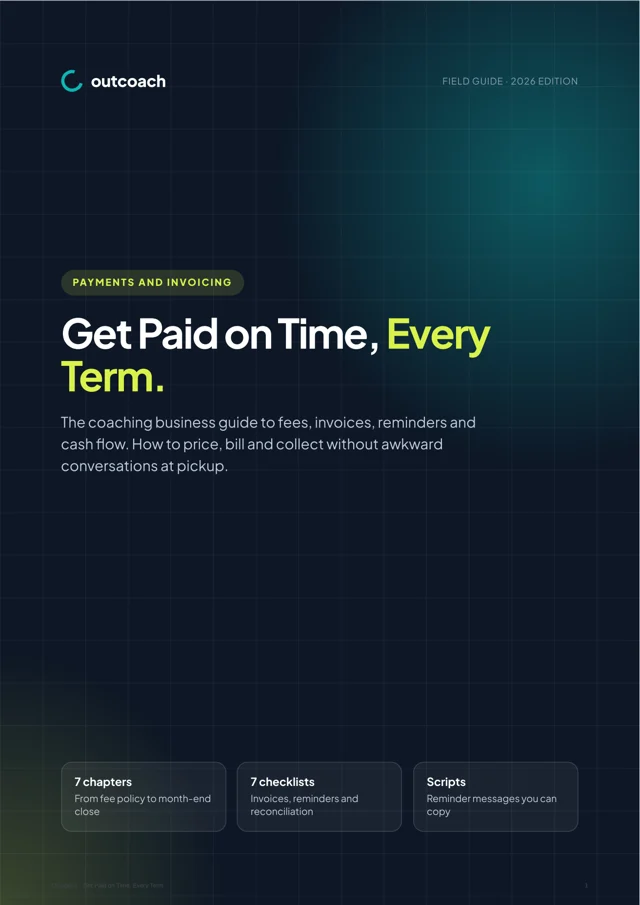
An 11-page guide to fees, invoices and cash flow for coaching businesses. Write a fee policy families respect, send invoices that are right first time and let reminders do the chasing.
- What your fee policy must say, as a checklist
- Invoice essentials and tax-invoice rules by country
- Reminder cadence and copy-ready scripts
- A month-end routine and the metrics that predict a cash crunch
Download it below.
Download the guideQuestions about payments and invoicing
Can’t see yours? Ask our team and a real person will reply.
How do I set myself up to accept payments?
We use Stripe, a trusted payment gateway. Once you’ve created your business account and connected Stripe, you send invoices to families from Outcoach. When they open an invoice they can pay you directly in the app, and the money goes to your bank account.
I’ve already got a payments system that works for me.
No problem, we hear this a lot. If you’d still like the rest of Outcoach, contact us and we’ll work out a discounted price for you. The payment features stay available, so you can try them whenever you like.
Will moving my students and classes into Outcoach be a pain?
No. We offer a free service to load your classes and contacts for you, so you can start your trial with your real data. If you decide Outcoach isn’t for you, there’s no charge.
What do you mean by ‘everybody gets access’?
Outcoach is a free mobile app for iPhone and Android. Parents and students download it and see their own upcoming classes, progress, notes and invoices at any time. Parents love being more involved, which helps with engagement and retention.
Can parents pay by bank transfer?
Yes. Families can pay by card through Stripe, by bank transfer, or at the point of booking or enrolment. Giving them options means you get paid faster.
Can I invoice a whole class at once?
Yes. The bulk invoice creator takes three steps: select the classes, edit the details once, then review every invoice before it’s sent. Each family gets a PDF invoice with their details filled in.
How do payment reminders work?
Outcoach sends reminders before and after the due date automatically. You can also send bulk reminders from the Payments page for due invoices, overdue invoices, or both.
Can I set up recurring billing?
Yes. Create a recurring invoice, choose how often it bills and how many days families have to pay, and Outcoach issues each one for you. The recurring billing forecast shows what’s coming in over the next three months.
Can I export invoices to my accounting software?
Yes. Export your invoices as a CSV from the Payments page and bring them into your accounting software or send them to your accountant.
Can I bill in currencies other than Australian dollars?
Yes. You set the currency on each invoice, so you can bill in AUD, SGD and other currencies.
Can I chase payments by just asking?
Yes. Ask AI sits on your Payments page. Type something like “Chase every overdue invoice” and it sends friendly reminders with pay links, then shows you what it did. See Outcoach AI.
Ready to get paid without the hassle?
Start your free trial today and send your first invoice in minutes. We’ll import your students and classes for free.