
Courts and rooms that book themselves.
An hour your court sits empty is an hour you never get back. Outcoach puts every court, room, lane and studio you run on your own booking site. Customers see what’s free, book and pay online, and the right price applies on its own: peak or off-peak, weekday or weekend, guest or member.
Your phone is not a booking system.
Most venues take court and room bookings by phone, text and a diary that only one person can read. It works until two groups turn up for the same court, or until you work out how many hours sat empty last month.
- Take bookings by phone, text and email
- Check a diary or spreadsheet for a gap
- Work out the price, and if they’re a member
- Chase payment after the court’s been used
- Find the clash when two groups turn up
- Guess which hours actually make money
Empty hours, awkward refunds and a phone that never stops.
Publish your venues once. Customers book a free slot, pay the right price and turn up to a court that’s theirs.
- Live availability on your booking site
- Peak, off-peak and weekend rates
- Member pricing for every level
- Paid at booking, every time
What online court hire does for your venue.
It’s not just fewer phone calls. When every space can be booked and priced properly, the same courts and rooms earn more.
Fill the quiet hours
A booking site that’s open around the clock, with sharper off-peak rates, gives people a reason to book the hours that used to earn nothing.
Charge what each hour is worth
Set different rates for peak, off-peak and weekends. Your busiest hours earn more, and your quietest get easier to sell.
Give members a reason to stay
Every membership level gets its own court rate, applied when they book. Members feel the saving every time, and guests see what they’d save by joining.
Never double-book again
Availability is checked live before every booking. Classes, events and closed times are blocked out first, so nobody can book a court you need.
From an empty court to a paid booking, in four screens.
Add your venues, set the hours and the price, and let customers book. Here’s every screen you’ll use.
Add every court, room and studio you run.
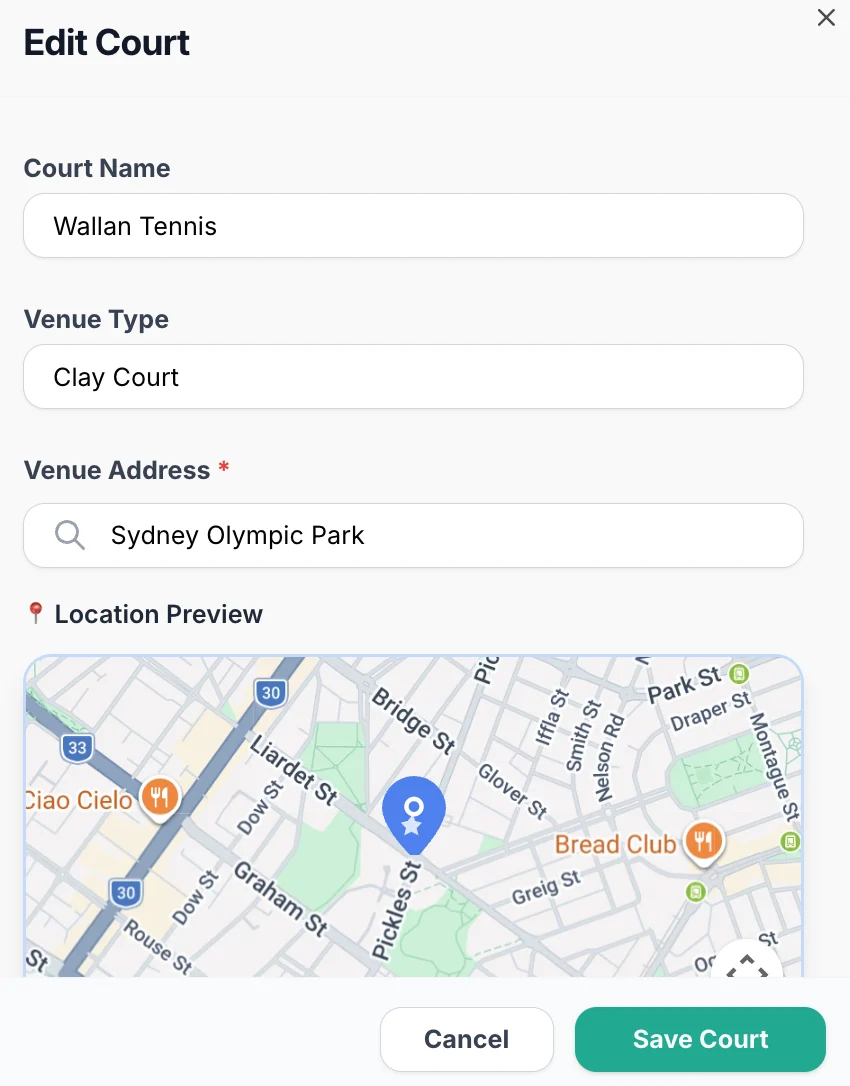
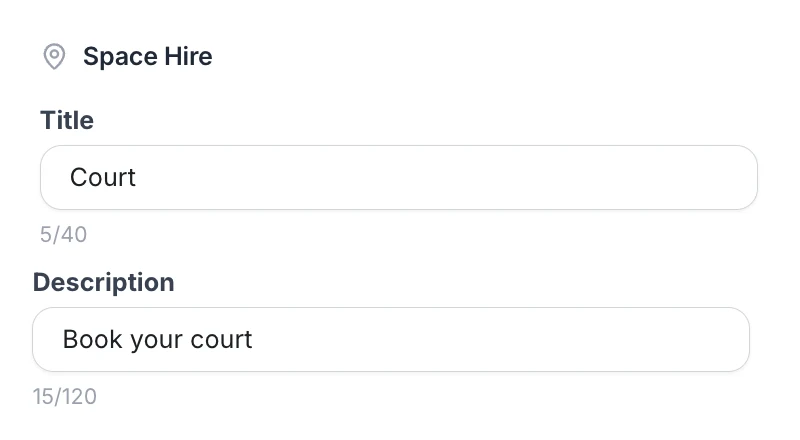
There’s no limit on venues. Add each court, room, pool lane or field with its own name, type and address. Then name your booking page in your own words, so customers see Courts, Rooms or Studios.
- 1A name customers recogniseCourt 4, Studio B or Lane 2, as you call them.
- 2Venue typeClay court, indoor court, dance studio or music room.
- 3Address and mapEach venue pinned, so multi-site customers go to the right one.
- 4Your booking page, your wordsSet the title and description customers see.
 1
2
3
1
2
3
 4
4
Set the hours and the price, by time and by member.
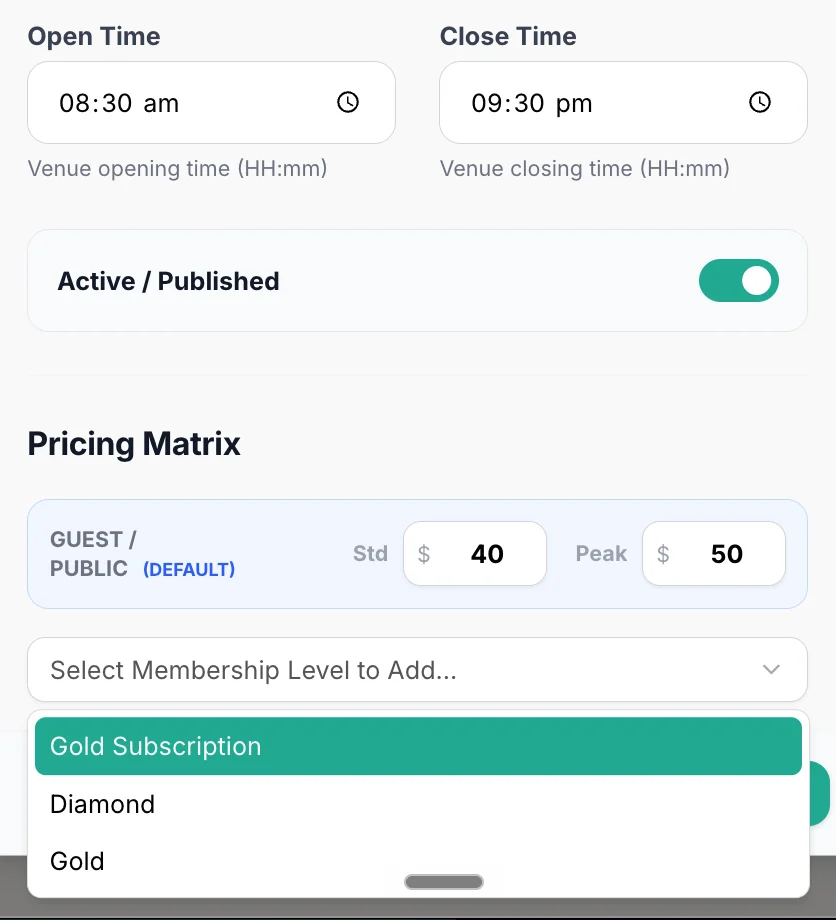
Give each venue its own opening hours and publish it when it’s ready. Then fill in its pricing matrix: a standard and a peak rate for guests, plus a separate rate for each membership level you sell.
- 1Open and close timesNothing can be booked outside them.
- 2Published or hiddenTake a court offline without deleting it.
- 3Standard and peak ratesGuests pay the default rate for the time they book.
- 4A rate for each membership levelGold, Diamond or whatever you call yours.
 1
2
3
4
1
2
3
4
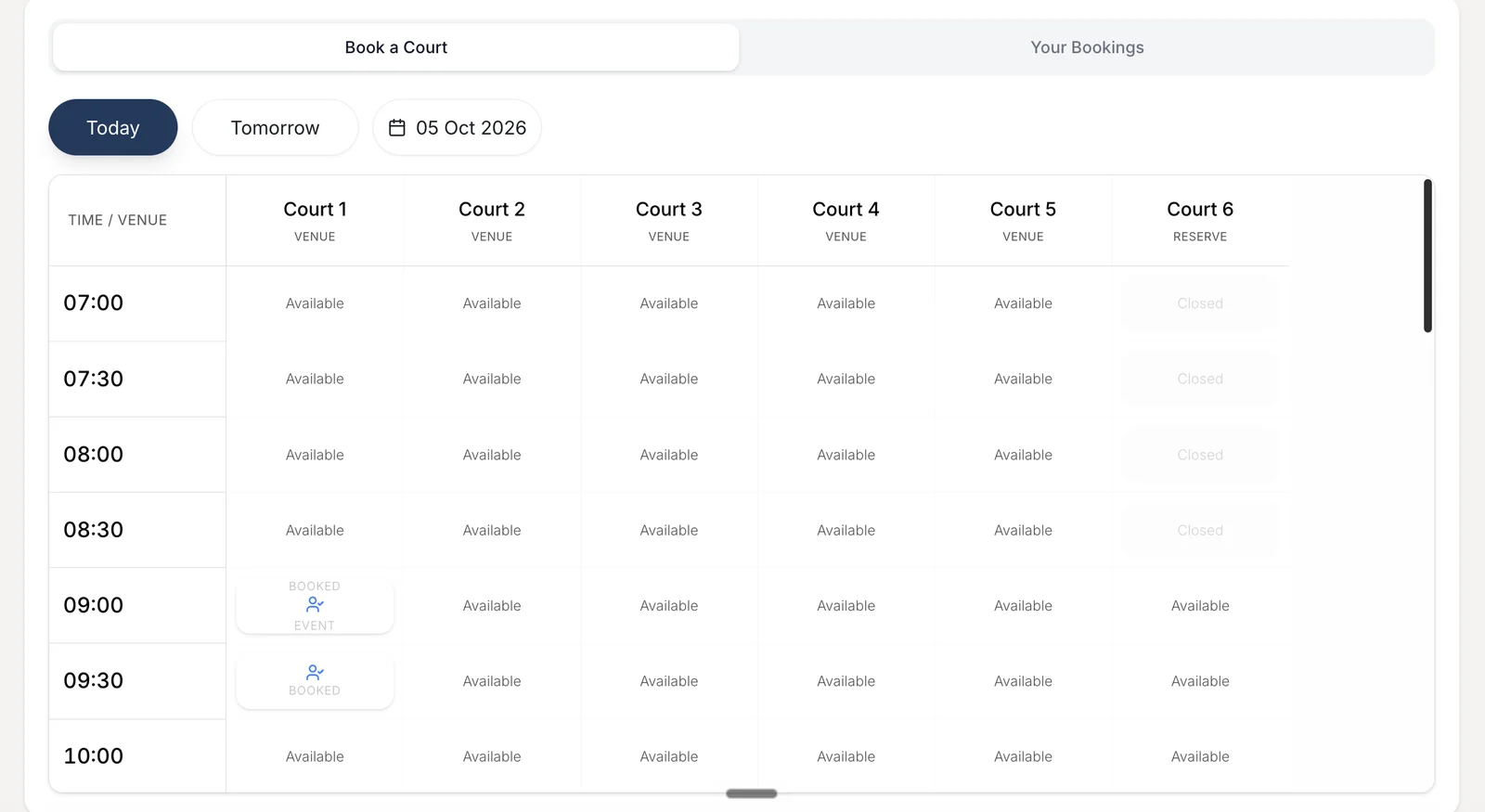
Customers pick a free slot and book it. No phone call.
Your venues sit on your Outcoach booking site and in the free app, with live availability by court and time. Booked slots, classes, events and closed times are already marked, so customers only see what they can actually have.
- 1Today, tomorrow or any dateThe next free hour is one tap away.
- 2Every court side by sideCompare free slots across all your venues.
- 3Classes and events already blockedYour squads keep their courts.
- 4Reserve courts stay closedUntil the hours you choose to open them.
1
2
3
4
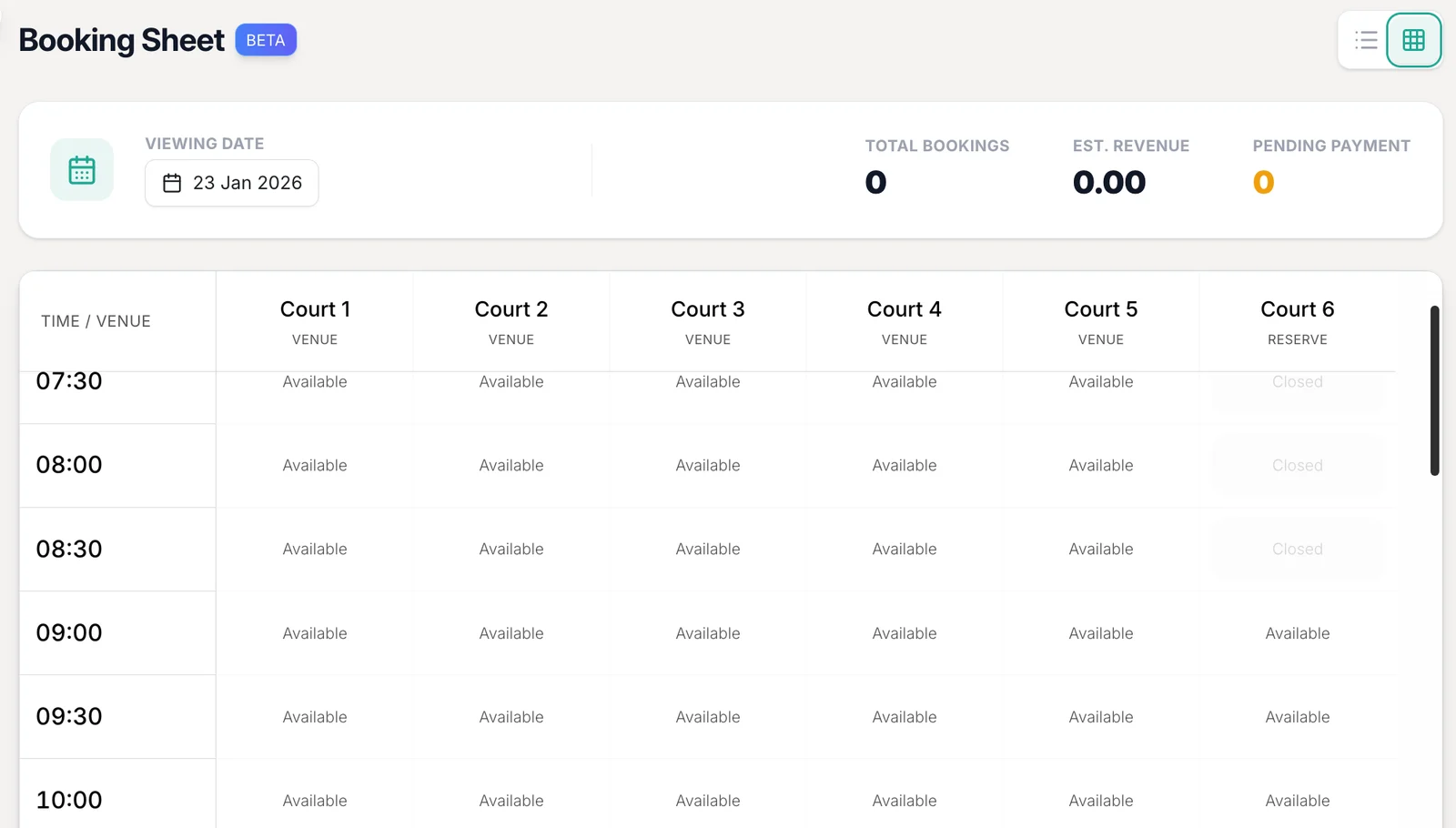
One sheet for every court, booking and payment.
Your booking sheet shows the whole day across every venue, with total bookings, estimated revenue and anything still waiting on payment. Jump to any date and switch between grid and list view.
- 1Any date, at a glanceSee today, next Saturday or the school holidays.
- 2Bookings and estimated revenueKnow what the day is worth before it starts.
- 3Pending paymentsSpot anything unpaid before the hirer arrives.
- 4Grid or list viewWhichever suits the desk that day.
 1
2
3
4
1
2
3
4
One court. The right price, every booking.
A flat rate undercharges at 6pm and overcharges at 2pm. In Outcoach, each venue carries its own rates for off-peak, peak and weekend hours, plus a rate for every membership level. The price is worked out when they book, so nobody on the desk has to.
Peak and off-peak rates
Charge more for the hours people fight over, and less for the ones they don’t.
Weekend pricing
Saturday mornings priced for what they are, not for a Tuesday afternoon.
A rate for each membership level
Guests pay the default. Members pay their level’s rate. When a membership lapses, they pay as a guest. Works with your memberships.
| Rate | Off-peakBefore 4pm | PeakFrom 4pm | WeekendSat, Sun |
|---|---|---|---|
| Guest / publicDefault | $30 | $40 | $45 |
| GoldMember | $22 | $32 | $36 |
| DiamondMember | $15 | $25 | $28 |
Try it. An example only: you set every rate, band and level.
Every space, every hour, every price, in one place.
Whether you run two tennis courts or a multi-sport centre with halls, pools and studios, Outcoach handles hire from first booking to final payment.
Unlimited venues
Add every court, room, lane, studio or field you run.
Address and map per venue
Run more than one site and send hirers to the right door.
Opening hours per venue
Each space opens and closes on its own schedule.
Publish or hide
Take a court offline for repairs without losing its settings.
Peak and off-peak rates
A standard and a peak price for every venue.
Weekend rates
Price Saturdays and Sundays separately from weekdays.
Member rates by level
Each membership package gets its own court price.
Paid when they book
Customers pay online at booking, straight to your account.
No double bookings
Availability checked live before any booking is confirmed.
Classes and events blocked
Your timetable takes its courts first. Hire fills the rest.
Booking sheet and revenue
Every booking for the day, with estimated revenue and pending payments.
Hirers book a court from their phone.
Outcoach is free on the App Store and Google Play. Once you set up your business, admins, coaches, members and hirers get the app at no cost, and each sees what’s relevant to them.
Admins
Venues, prices and the booking sheet, on the web or your phone.
Coaches
See which court each class is on and what’s booked around it.
Members and hirers
Find a free court, book it, pay and see every booking in one place.
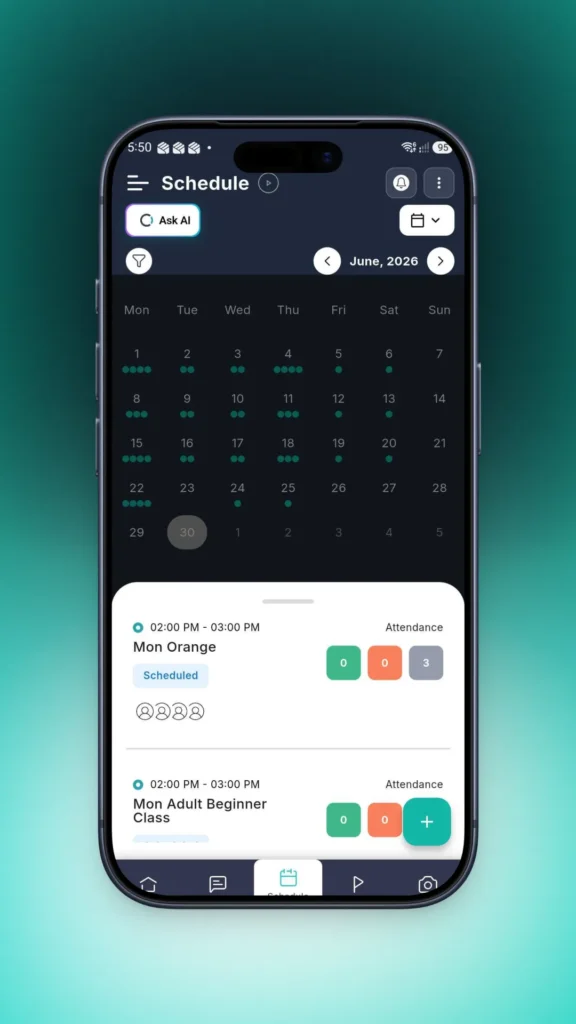
Or skip the clicks and just ask.
Ask AI knows your courts, bookings and members. Ask it the way you’d text a colleague and it checks what’s free, how busy each court was and who still owes for a booking, then shows you what it found.
Taking court bookings by the end of the week.
You don’t have to rebuild anything by hand. We’ll help you move across.
Add your venues
Create each court, room or studio with its name, type, address and opening hours.
Set your prices
Fill in off-peak, peak and weekend rates for guests and each membership level. We’ll import your members for free.
Share your booking link
Publish your venues and send the link to members and hirers. Bookings and payments run from there.
Free guide: every hour booked.
A 10-page guide to pricing and filling courts and rooms. Find your quiet hours, set peak, off-peak and weekend rates, build a member price ladder and write booking rules that stop clashes and no-shows.
- A two-week utilisation audit and rate card worksheet
- Peak, off-peak and weekend pricing people understand
- A member price ladder you can adapt
- Fair cancellation rules and the 2026 card surcharge change
Download it below. We’ve also sent a copy to your inbox.
Download the guideCan I add more than one court or room?
Yes. Add as many venues as you run, from two tennis courts to a multi-sport centre. Each court, room, lane or studio has its own name, venue type, address, opening hours and pricing.
What kinds of spaces can I hire out?
Any space that can be booked by the hour: tennis, pickleball, padel, squash and basketball courts, pool lanes, dance studios, music rooms, halls, sports fields and meeting rooms. If it has a time slot, Outcoach can take bookings for it.
How do peak and off-peak prices work?
Each venue has a standard rate and a peak rate, and you can price weekends separately. When a customer books, Outcoach applies the rate for the time they’ve chosen, so the desk never has to work it out.
Can members pay a different price from guests?
Yes. Add each membership level to a venue’s pricing matrix and give it its own rates. Guests pay the default rate, members pay their level’s rate, and anyone whose membership has lapsed pays the guest rate. It works with Outcoach memberships.
How do customers book a court?
Through your Outcoach booking site or the free Outcoach app. They pick today, tomorrow or any date, see live availability across your courts, choose a free slot and book it. No phone call or email needed.
Do customers pay when they book?
Yes. Payment is taken online at the time of booking, so you’re not chasing invoices after the court has been used. Your booking sheet shows anything still pending payment for the day.
Can court bookings clash with my classes?
No. Availability is checked live before any booking is confirmed. Classes, events and closed times show as unavailable, and nothing can be booked outside a venue’s opening hours.
Can I take a court offline or keep one in reserve?
Yes. Switch a venue from published to hidden for repairs or private use, without losing its settings. You can also set a reserve court to open later in the day, so it shows as closed until then.
What happens if someone cancels?
The slot reopens for someone else to book, the hirer is notified, and the payment is handled according to your cancellation policy. You don’t have to step in.
Do I pay extra for court and room hire?
No. Court and room hire is included in Outcoach for one price, with no price hikes and no hidden costs.
Turn every empty hour into a booking.
Add your first court in minutes. Outcoach handles availability, pricing and payment from there.