
Getting started is the easy part.
Send us your contact list and Outcoach sorts every parent, student and coach into the right place. Then we help set up your classes, train your team and get families on the app. Most of the work is ours.
- Contact list uploaded248 people sorted into parents, students and coachesDone
- Classes set up for Term 436 weekly classes, 6 coaches assigned, holidays markedDone
- 3Team trainingAdmins trained. Coaches’ session Tuesday at 4pmThis week
- 4Families invited to the appInvites go out to 112 parents on MondayNext
Four steps from sign-up to go-live.
You don’t rebuild anything by hand. You send us what you already have, and we help with the rest.
Upload your contact list
One spreadsheet from your current system. Outcoach finds every parent, student and coach. How it works
Set up your classes
Add a class in a minute, or ask Outcoach AI to create it for you. How it works
Train your team
Admins and coaches learn the parts they use, with live sessions, videos and cheat sheets. How it works
Families download the app
Parents get an invite, download the free app and see everything about their child. How it works
Your people and classes, in by the end of the week.
These are the two jobs that put most businesses off switching. In Outcoach they take a few hours, and we can do them with you.
Upload your contact list. We’ll work out who’s who.
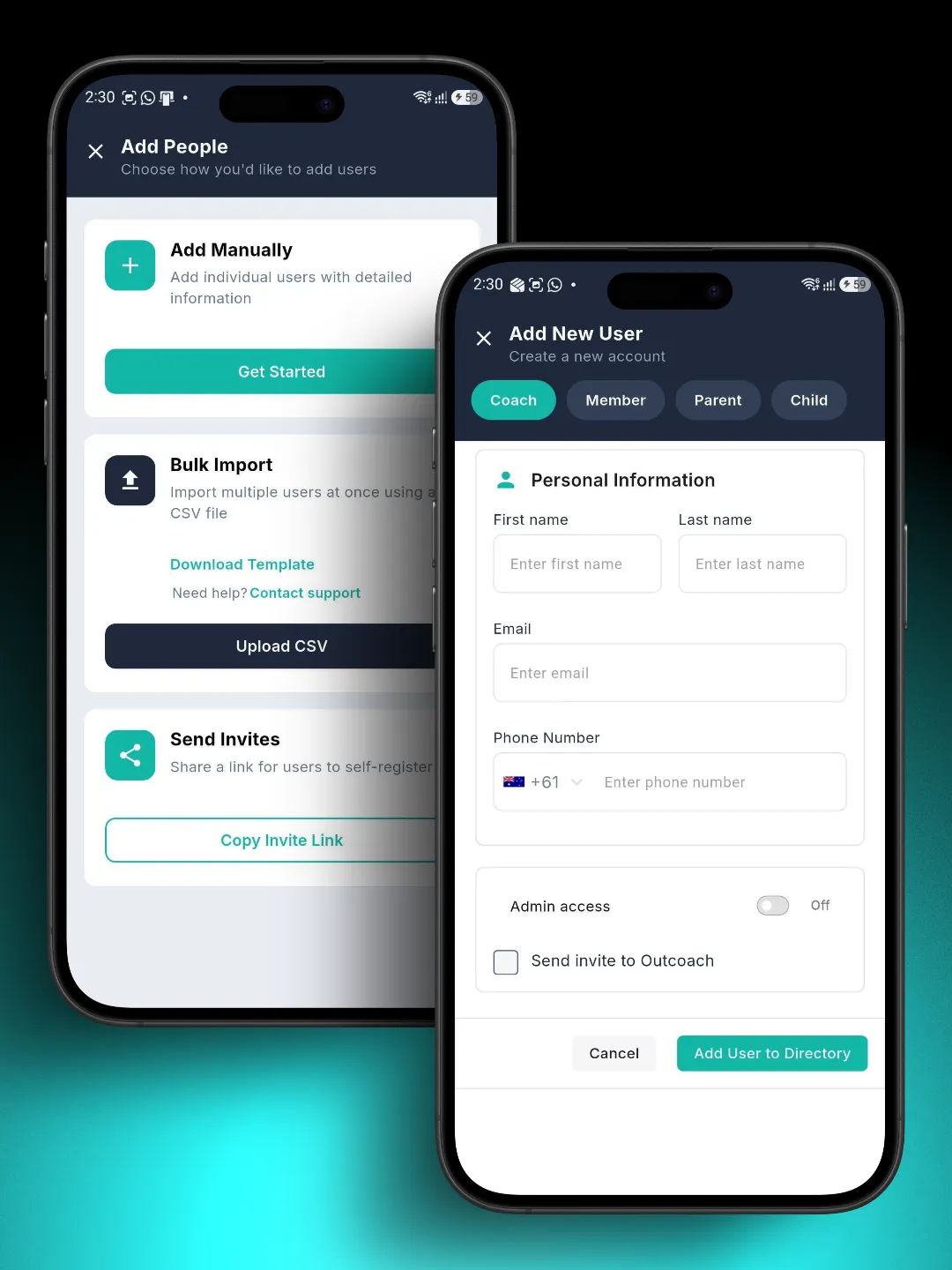
Most businesses export a spreadsheet from their old system and upload it as a CSV. Outcoach imports everyone at once and links each child to their parents. Processing takes a few hours, and you get an email when it’s done.
- Bulk import from a CSVEvery parent, student and coach in one upload.
- Add people one at a timeChoose coach, member, parent or child, then add their details.
- Share an invite linkPeople join and create their own accounts.
- Or send the list to usWe’ll import it for free during your trial.
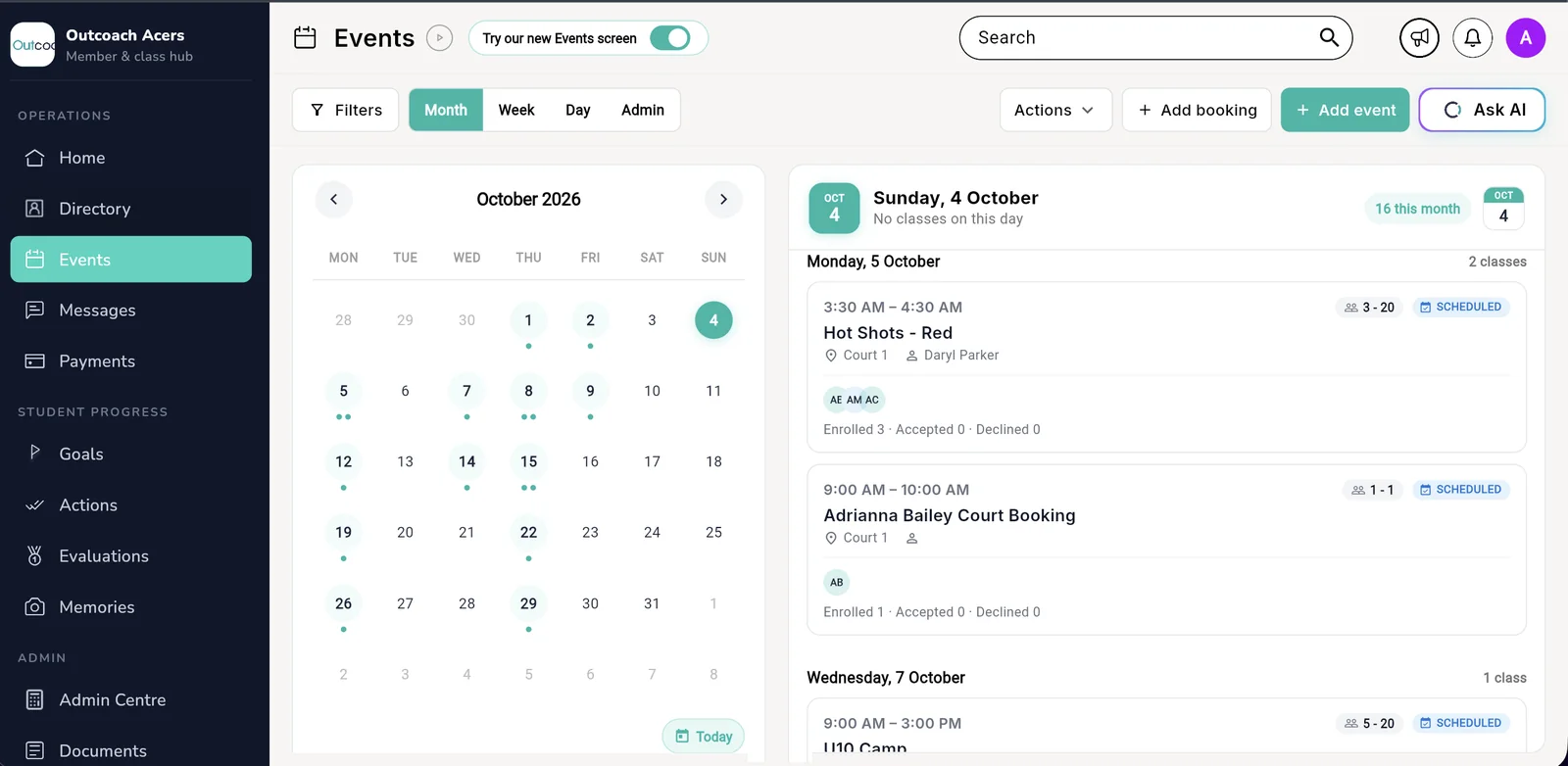
Classes set up in an afternoon. Or ask AI to do it.
Create a class once with its name, type and category, assign the coaches and set the schedule. It repeats for the whole term. If you’d rather not fill in a form, tell Outcoach AI what you run and it creates the classes for you.
- Group, private and semi-privateEach class works the way you run it.
- Coaches assigned from day oneThey see their own classes as soon as they’re added.
- A whole term in one goSet the schedule once, then copy it forward next term.
- Holidays and term breaksMark them once so nobody turns up to a locked gate.
Training for everyone who uses Outcoach.
Each person learns the parts of Outcoach they actually use. Admins get the full picture. Coaches learn their day. Families just download the app.
Admins
Admins run enrolments, payments and the timetable from Outcoach, so they get the full walkthrough.
- Enrolments and online bookings
- Invoices, payments and reminders
- Classes, terms and holidays
- Reports and Ask AI
Format: live sessions, videos and a term setup checklist
Coaches
Coaches learn what they need from their phone. It’s a short session, not a course.
- See today’s classes and who’s booked
- Mark attendance in a tap
- Log goals and feedback after class
- Message parents and the whole class
Format: a short session, videos and a one-page cheat sheet
Parents and students
No training needed. They get an invite, download the free app and see everything about their child.
- An invite by email or a link
- Free on iPhone and Android
- Schedule, progress and invoices
- Report absences and pay by card
Format: a welcome guide you can send to every family
Training built around how you run things.
Every business runs a little differently. We can build training around your classes, your terms and your team, recorded on your own setup, so what people learn matches what they see when they log in.
- Training videos on your own setup, for each role
- Cheat sheets for the front desk and the court, one page each
- Step-by-step guides for the jobs you do every term
- Live sessions, with recordings for staff who join later
- Admin walkthrough: a term from start to finishEnrolments, invoices and remindersVideo
- Marking attendance and feedbackFor coaches, on their phoneVideo
- Coach cheat sheet: your day in OutcoachPrint it or keep it on your phonePDF · 1 page
- Term setup checklistClasses, holidays and invoicesPDF
- Welcome guide for familiesSend it with the app invitePDF · 1 page
- Live Q&A with your teamRecorded for new staffVideo call
For families, it’s download and go.
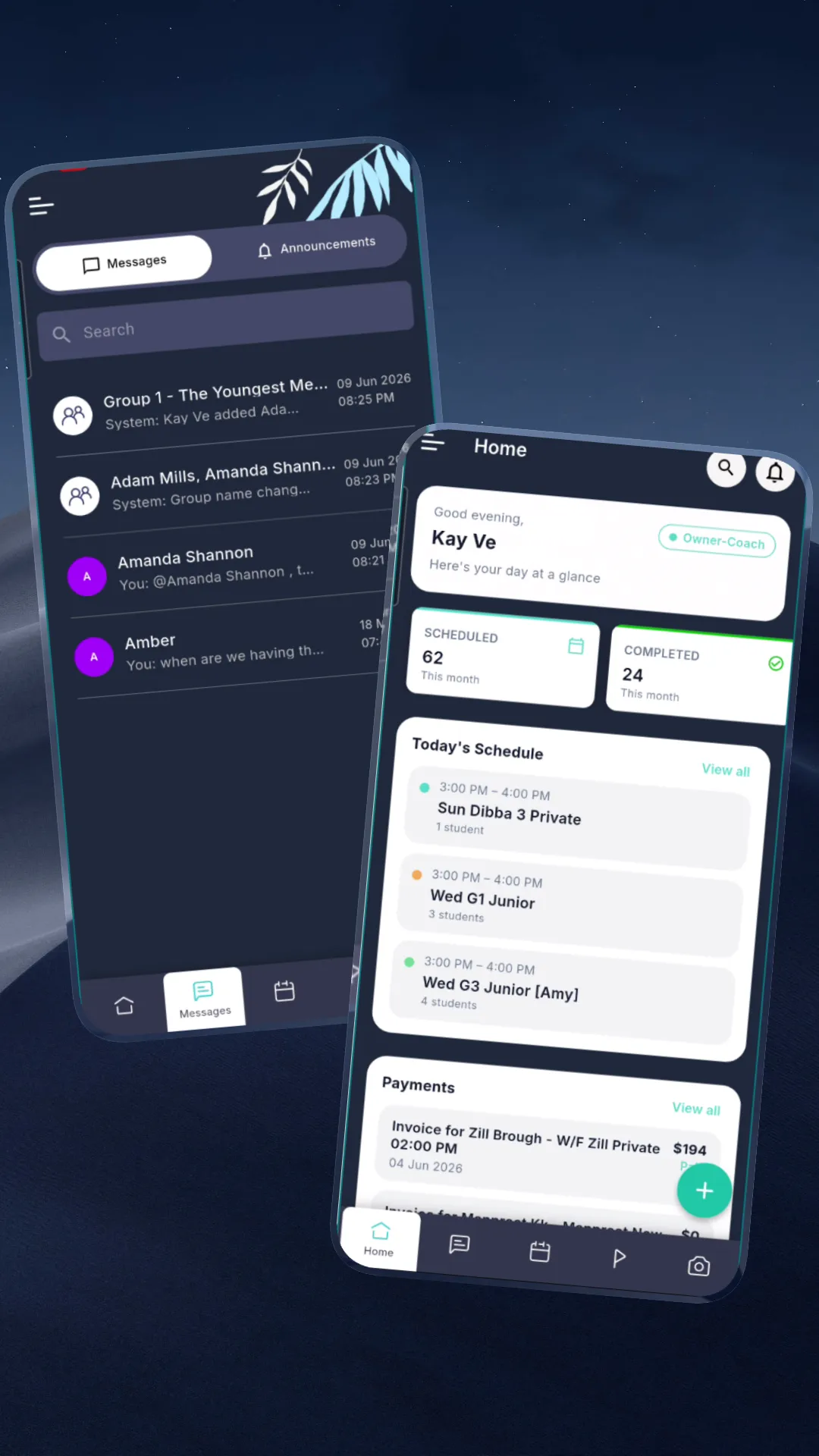
Parents get an invite, download the free Outcoach app and sign in. They see their child’s classes, progress and invoices straight away. There’s nothing for them to set up and nothing for you to explain.
An invite in their inbox
Outcoach emails each parent, or you share a link they can join from.
Everything about their child
Schedule, coach feedback, goals, photos and invoices, all in one place.
Only their own family
Each parent sees their child’s information and no one else’s.
You send the list. We do the heavy lifting.
Switching systems sounds like a project. Here’s how little of it lands on your desk.
- 1Export your contact list from your current system, or send the spreadsheet you already use.
- 2Tell us how your classes run: days, times, levels and coaches.
- 3Pick training times that suit your admins and coaches.
That’s usually an hour or two of your time.
- Import every parent, student and coach, with children linked to their families
- Help set up your classes and term, or show you how to do it with AI
- Train your admins and coaches, with videos and cheat sheets to keep
- Help you invite families to the free app, with a welcome guide to send
- Answer your questions as a real person, before and after you go live
You’re never doing this on your own.
Answers are written down for when you want to look things up, and a real person is there when you’d rather ask.
Data migration
Moving from another system? Send us your export and we’ll take it from there.
Email support →How long does it take to get started?
Most businesses have their people and classes in Outcoach within a week. Training then runs alongside, at a pace that suits your team. Families can be on the app as soon as their classes are set up.
Will you move our data across for us?
Yes. Send us your contact list, usually a spreadsheet exported from your current system, and we’ll import your students, parents and coaches for free during your trial. You can also upload it yourself as a CSV.
What should be in our contact list?
Names, emails and phone numbers for your students, parents and coaches. If you have it, include which parent belongs to which child. A spreadsheet from your current system is usually all we need. If you’re unsure, email support@outcoach.io.
Can you help set up our classes?
Yes. You can add classes yourself with the Add Event form, ask Outcoach AI to create them for you, or have us help you set up your timetable. Once a class is set up, it repeats for the term.
How does creating classes with AI work?
Tell Outcoach AI what you run in plain English, for example “Hot Shots Red every Monday at 3:30pm for Term 4, coached by Daryl”, and it creates the classes on your calendar. See Outcoach AI.
What training do you provide?
Admins get a full walkthrough of running the business on Outcoach. Coaches learn how to see their classes, mark attendance, log feedback and message parents. Families get a welcome guide, because the app is simple enough to use without training.
Can you create custom training for our team?
Yes. We can build training around your classes and your setup, including training videos, one-page cheat sheets and step-by-step guides, plus live sessions that are recorded for new staff. Talk to us about what your team needs.
Do parents and students need training?
No. Parents get an invite, download the free app and sign in. They see their child’s schedule, progress and invoices straight away. See the parent app.
Do we have to move everything across at once?
No. You can start with one program or one term and bring the rest across when you’re ready.
Where do we go if we get stuck?
Our Help Center has step-by-step articles, and you can contact support any time. A real person will reply.
Send us your list. We’ll take it from there.
Start your free trial today. Your people and classes can be in Outcoach by the end of the week.