
Run your makeup classes on autopilot.
Set your makeup policy once for each type of class. When a student misses, Outcoach issues the credit, lets the family book a makeup at the right level, and keeps every balance up to date.
Makeups shouldn’t take up your whole Monday.
Built by coaches, Outcoach knows how much time makeups take each week: juggling schedules, rosters and credits for every missed lesson. Your policy runs the process, so you don’t have to.
- A parent texts to say their child is sick
- Check your policy: did they give enough notice?
- Log the credit in a spreadsheet
- Hunt for a class at the same level with a free spot
- Message back and forth to agree on a time
- Add them to the roll and update the spreadsheet again
Six jobs for one absence. Now multiply by every absence this week.
The parent marks the absence. Your rules decide the credit. They book their own makeup.
- Absences reported from the parent app
- Credits issued by the rules you set
- Only classes at the right level, with space
- Credits deducted when the makeup is booked
Save hours every week
Makeups take more organising than anything else in the week. Once they run themselves, that time is yours again.
Set and honour your policies
Every family gets the same rules, applied the same way. That’s part of running a professional coaching business.
Still your call
Approve bookings yourself if you prefer, and give or take back credit whenever a case needs a human.
From missed lesson to makeup booked, without you in the middle.
Outcoach brings your rules, attendance, credits and booking page together, so the whole makeup process runs on its own while you stay in control.
Every type of class gets its own rules.
Private lessons and group classes don’t work the same way, so their makeups shouldn’t either. Set the policy once on each event type and Outcoach applies it to every absence.
- 1Cap the credits per studentStop credits piling up with a maximum per student.
- 2Set a minimum notice periodIn hours, per class type. Privates can need more notice than groups.
- 3Open up the absent student’s spotEvery recorded absence frees a place for someone else.
- 4Bypass the limit when it’s not their faultCoach cancellations and washouts don’t count against the cap.
Mark the absence. The credit takes care of itself.
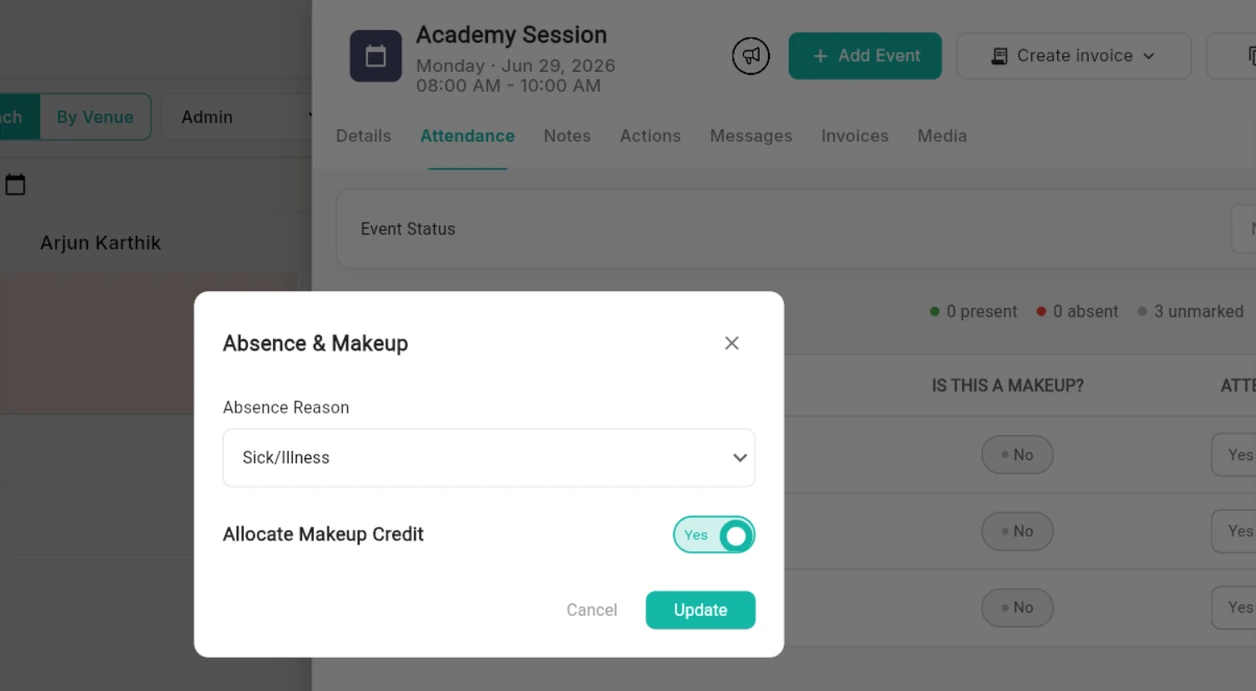
Parents can report an absence in the app, or you can mark it on the roll. Choose the reason and Outcoach checks it against your rules, then adds the makeup credit to the student’s balance.
- 1Right from the attendance rollNo separate system, no spreadsheet to update.
- 2Record the reasonSo only the absences your policy covers earn a credit.
- 3Allocate the makeup creditOne toggle, and it lands on the student’s balance.
- 4Present, absent and unmarkedSee who’s still to be marked at a glance.
 1
2
3
4
1
2
3
4
Families book their own makeups, any time.
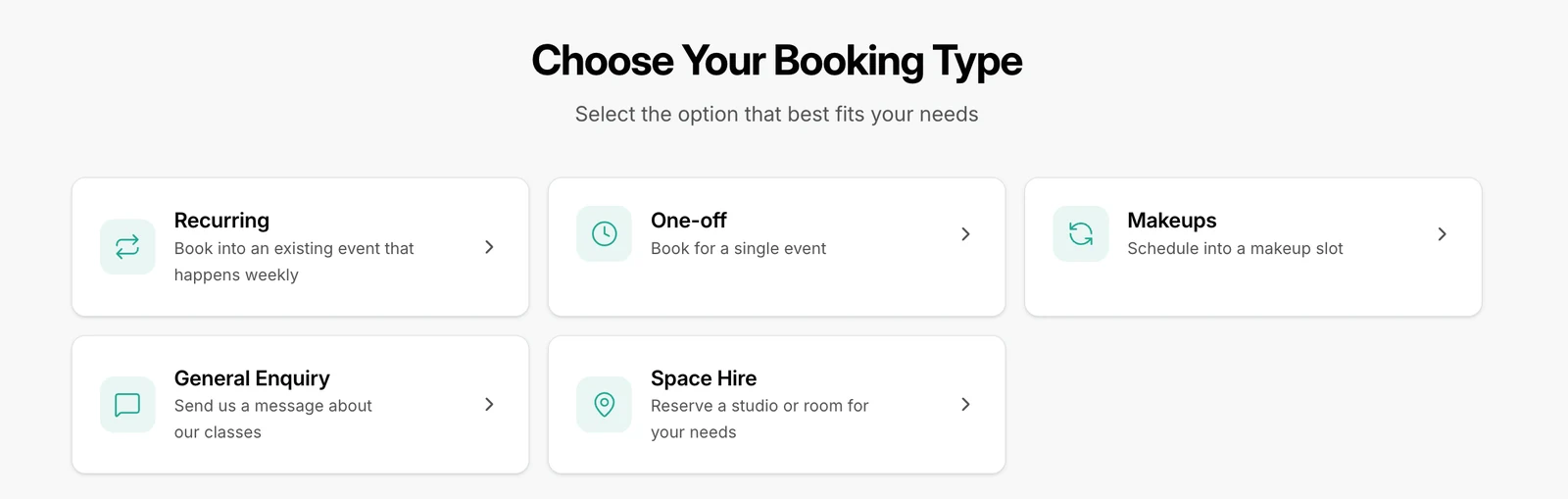
Makeups sit on your booking page next to your regular classes. Parents enter their email, verify their details and see every child with their remaining credit, so nobody needs to call you to rebook.
- 1Makeups is its own booking typeRight alongside recurring, one-off and space hire.
- 2Their credit, front and centreFamilies see exactly how much makeup credit they have.
- 3Only classes they have credit forCredits are tied to event types, so they’re only spent where they should be.
- 4Book now, credit deductedThe balance updates on its own. Nothing to reconcile.
 1
1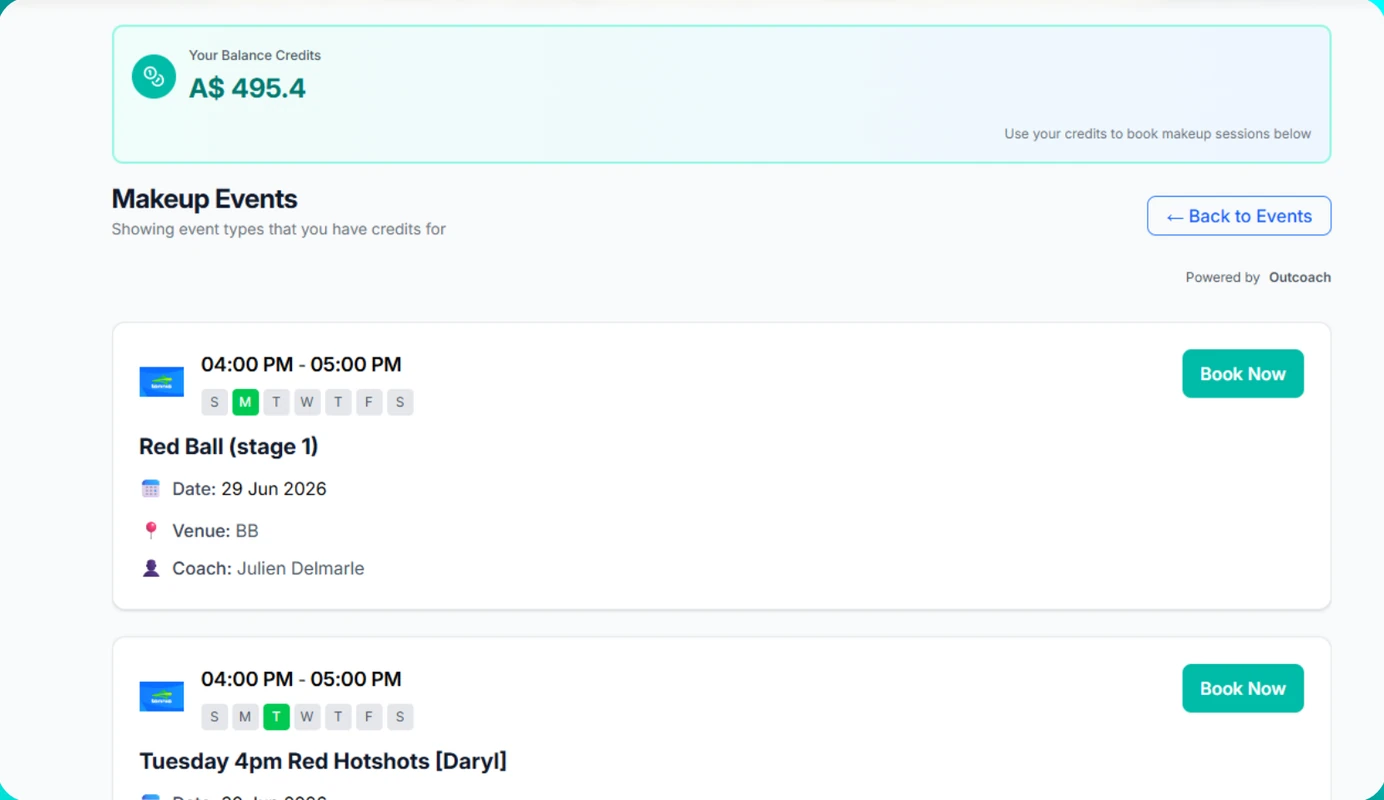 2
3
4
2
3
4Group makeups, always at the right level.
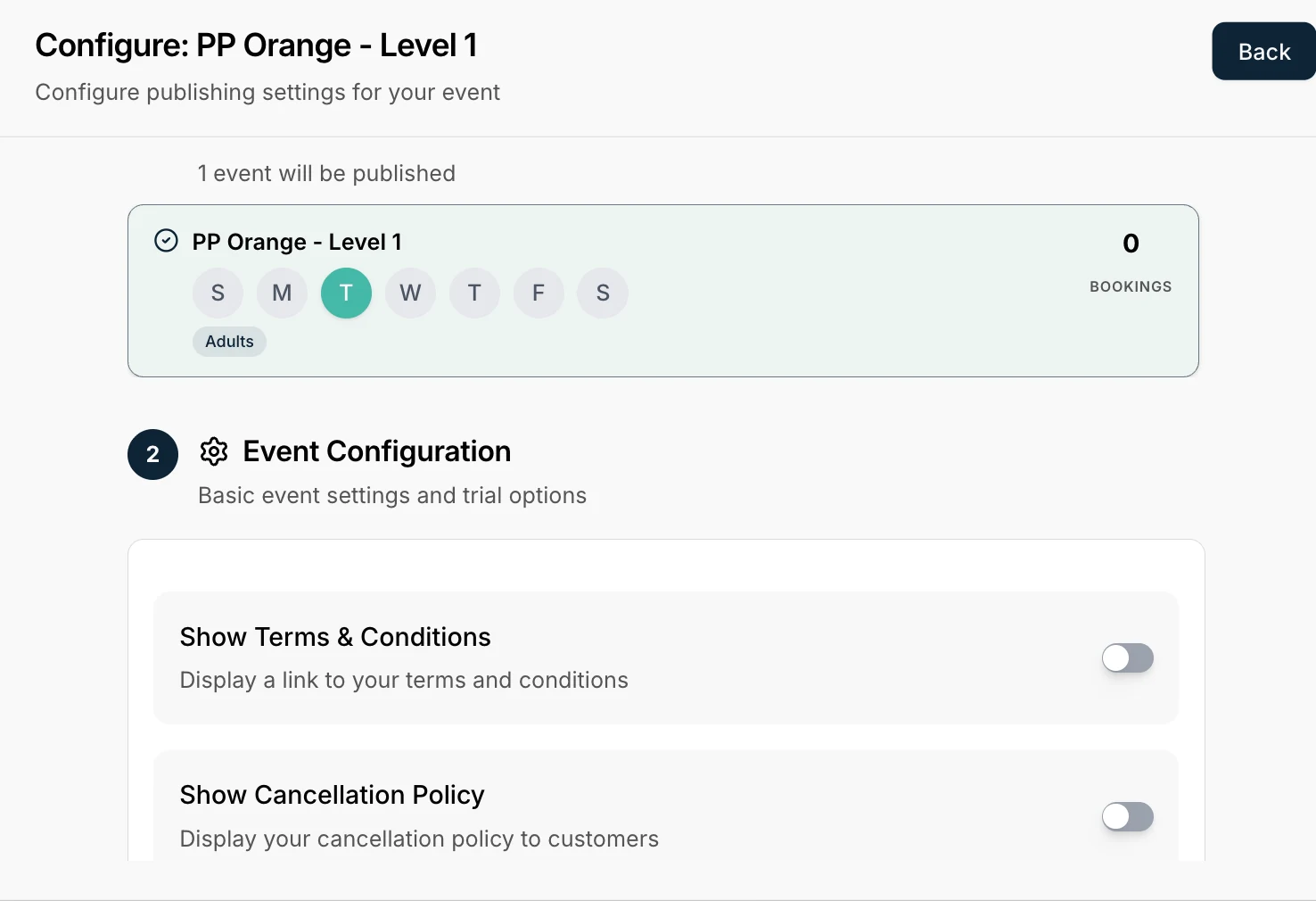
Publish your group classes to the booking page as makeup options. Outcoach reads each student’s level from the classes they’re enrolled in, so they can only book a class at their standard, and only when there’s space.
- 1Publish classes for makeupsPick the classes families can use their credit on.
- 2Levels matched automaticallyNo level field to update every time a student moves up.
- 3Bookings checked against capacityA makeup never overfills a class.
- 4Show your terms and cancellation policyFamilies see the rules before they book.
 1
2
3
4
1
2
3
4
Private makeups slot into your coaches’ free time.
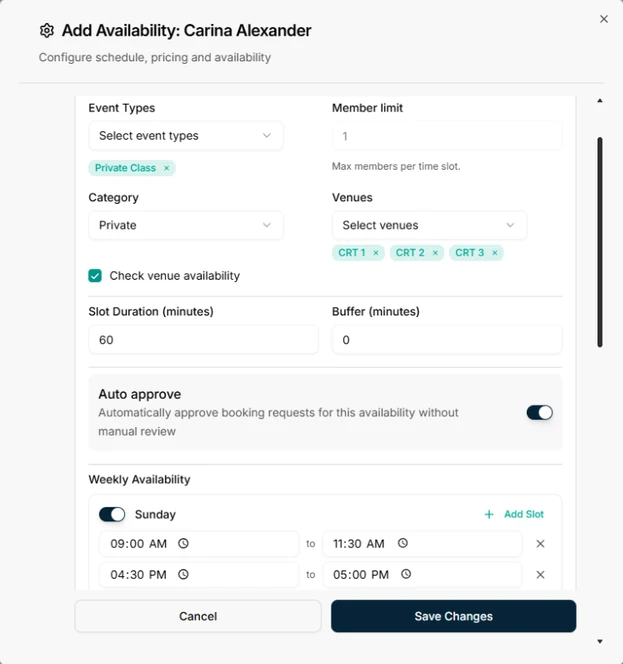
Coaches set their own availability for private lessons. Families pick a slot that suits them and pay with their credit. Depending on your settings, that can be the same coach or the same venue only.
- 1Availability per coachWeekly slots for each type of private lesson.
- 2Venues checked for clashesTwo lessons never land on the same court.
- 3Slot length and buffer timesGive coaches a breather between lessons.
- 4Auto-approve or reviewAccept bookings straight away, or check each one first.
 1
2
3
4
1
2
3
4
Coaches see who’s on a makeup before class starts.
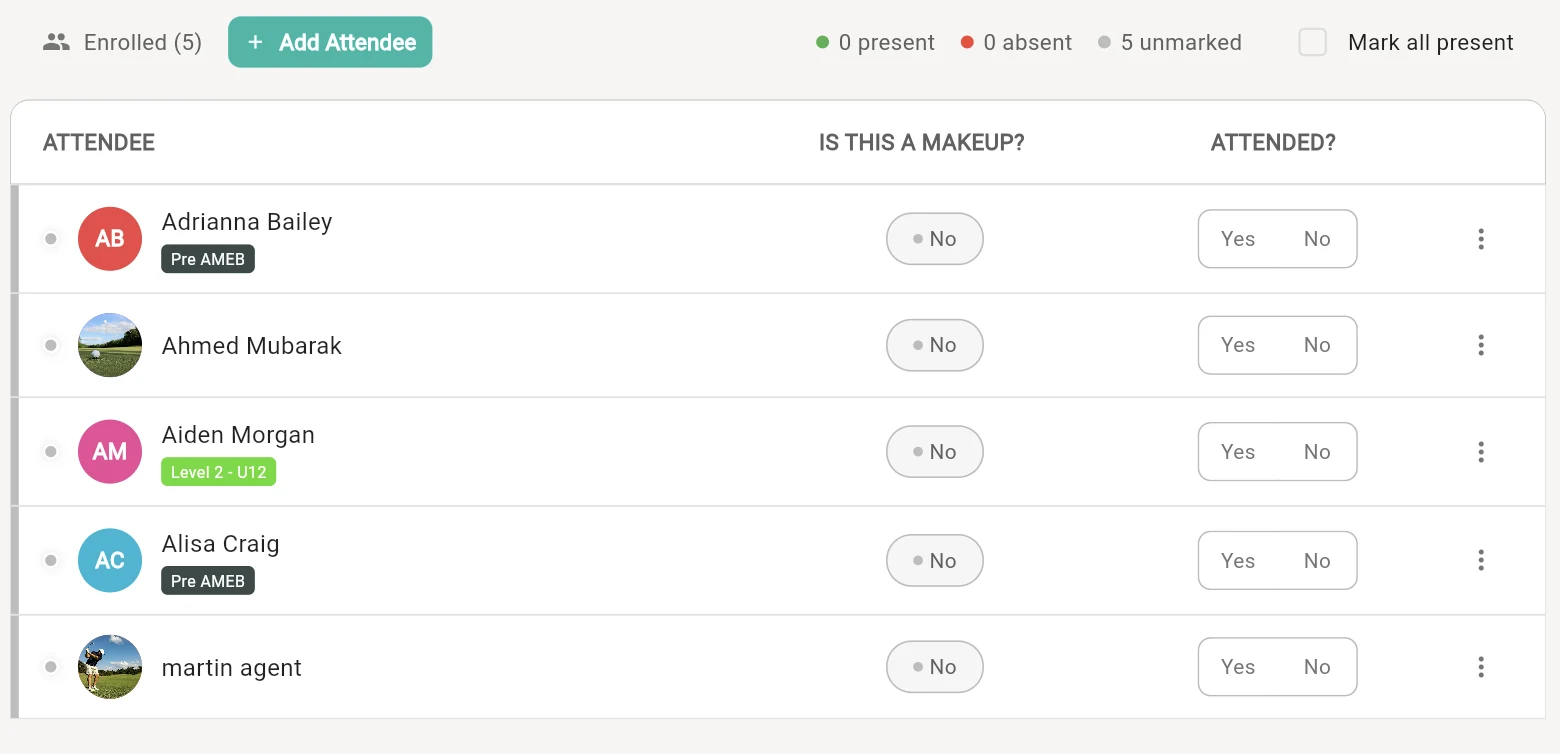
Makeup students appear on the roll with everyone else, clearly flagged. Coaches mark attendance as usual and Outcoach keeps the credits right.
- 1Add a student to any classDrop in a makeup by hand when you need to.
- 2Makeups flagged on every rowNo surprises when an extra face turns up.
- 3Attended, yes or noMarking someone absent can earn them a credit, based on your rules.
- 4Live headcountPresent, absent and unmarked, as you go.
 1
2
3
4
1
2
3
4
Your rules run it. You still have the final say.
There will always be cases that need a human. Change any credit by hand, and see every makeup on the schedule at a glance.
Every credit on record, and yours to override.
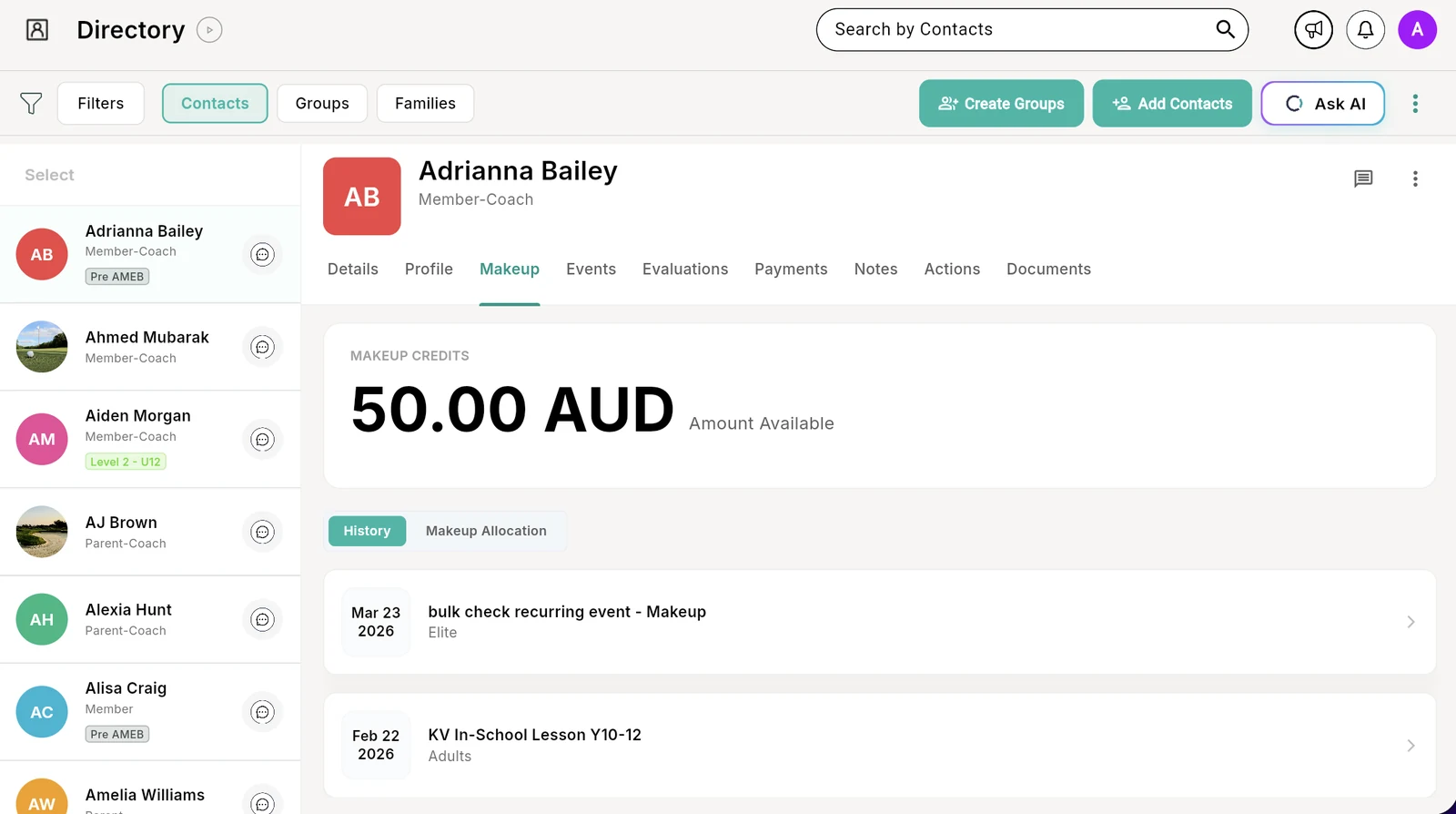
Each student profile has a Makeup tab with their balance, every makeup they’ve used and every credit they’ve been given. Give or take back credit by hand for the exceptional cases.
- 1A Makeup tab on every profileRight next to their events, payments and notes.
- 2Balance as a dollar amountThe amount they have left to spend on makeups.
- 3Full makeup historyWhich class, which date, so disputes settle fast.
- 4Every allocation loggedIncluding the credits you added or removed by hand.
 1
2
3
1
2
3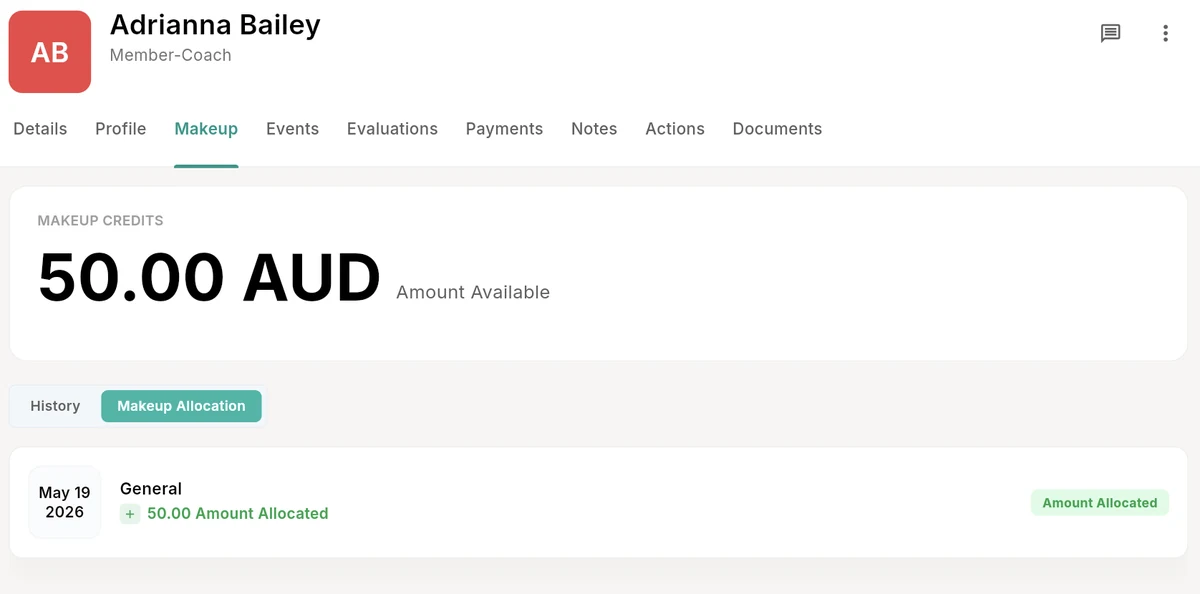 4
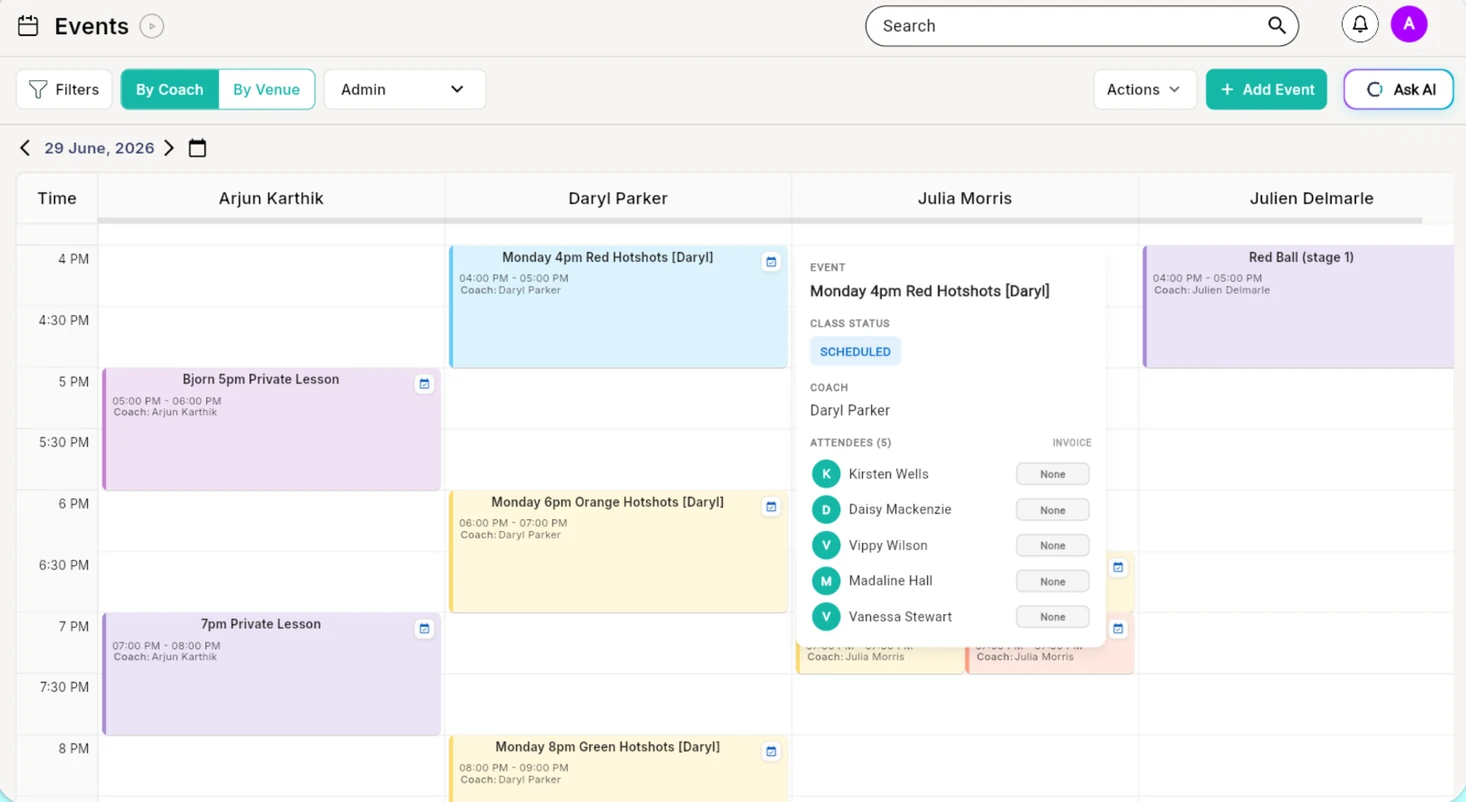
4See your entire makeup schedule.
Every class and makeup on one calendar, by coach or by venue, so you can stay on top of the whole week.
- Search and filterFind a specific class or makeup in seconds.
- Hover for the detailsCoach, status and attendees, without opening the class.
- By coach or by venueSee who’s teaching what, and where.
Everything your makeup policy needs.
The settings coaching businesses ask for most, built in. Turn on what fits your policy and leave the rest.
Rules per class type
Privates, groups and semi-privates can each have their own makeup policy.
Minimum notice
Set how many hours’ notice a family must give to earn a credit.
Credit limits
Cap the active credits each student can hold at once.
Washouts don’t count
Weather and coach cancellations can bypass the limit, since they’re not the family’s fault.
Eligible absence reasons
Decide which reasons earn a makeup credit.
Absent spots open up
Every recorded absence frees a place for another student.
Same coach or venue
Limit makeups to the same coach or the same venue with a toggle.
Auto or manual approval
Accept makeup bookings automatically, or review each request.
Level matching
Students can only book a makeup at their own standard.
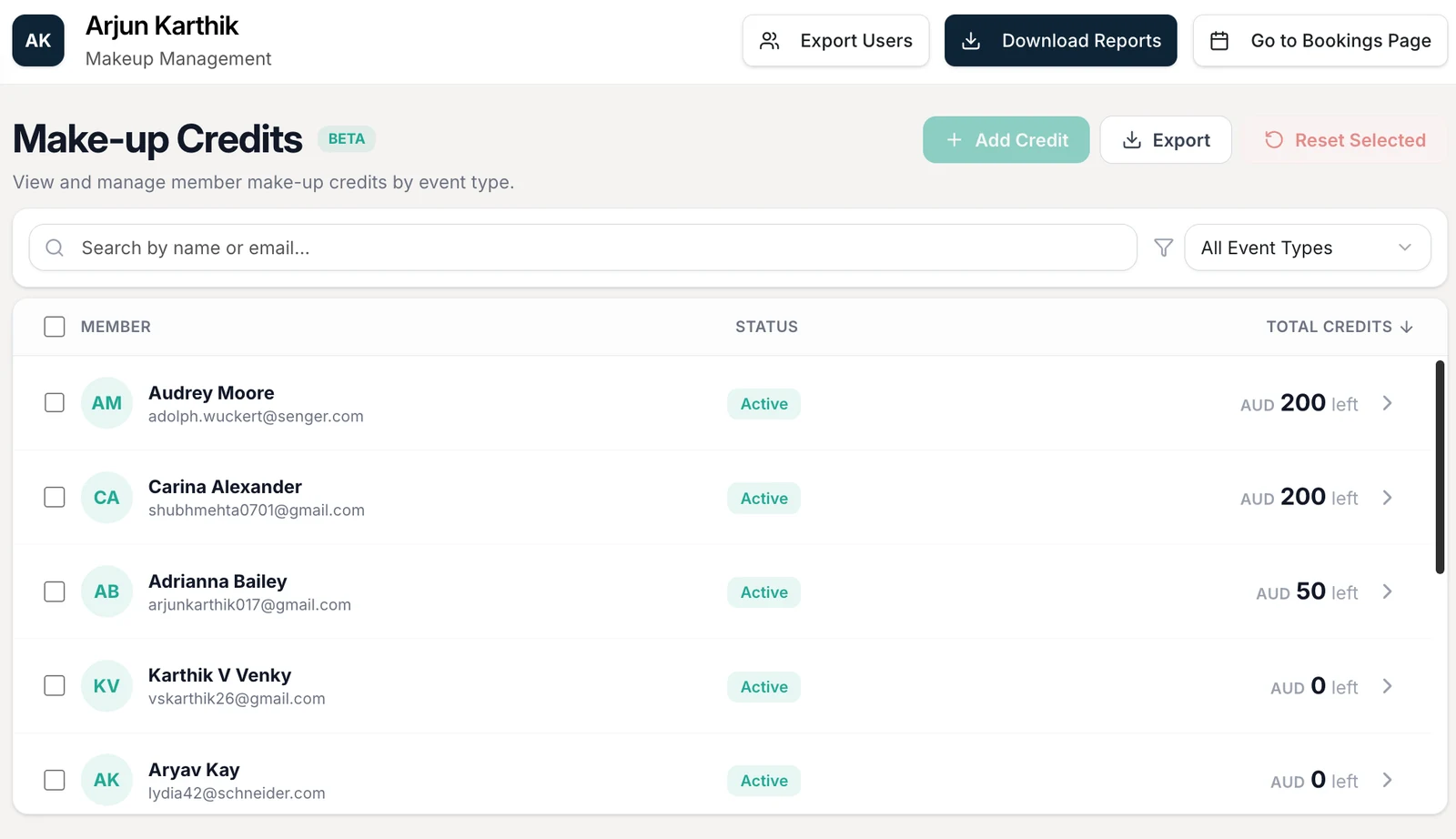
Add or reset credits
Add credit to anyone, or reset credits for selected members in one go.
Filter by event type
See who holds credit for which kind of class.
Everyone kept in the loop
Admins and coaches get an email when a family reports an absence.
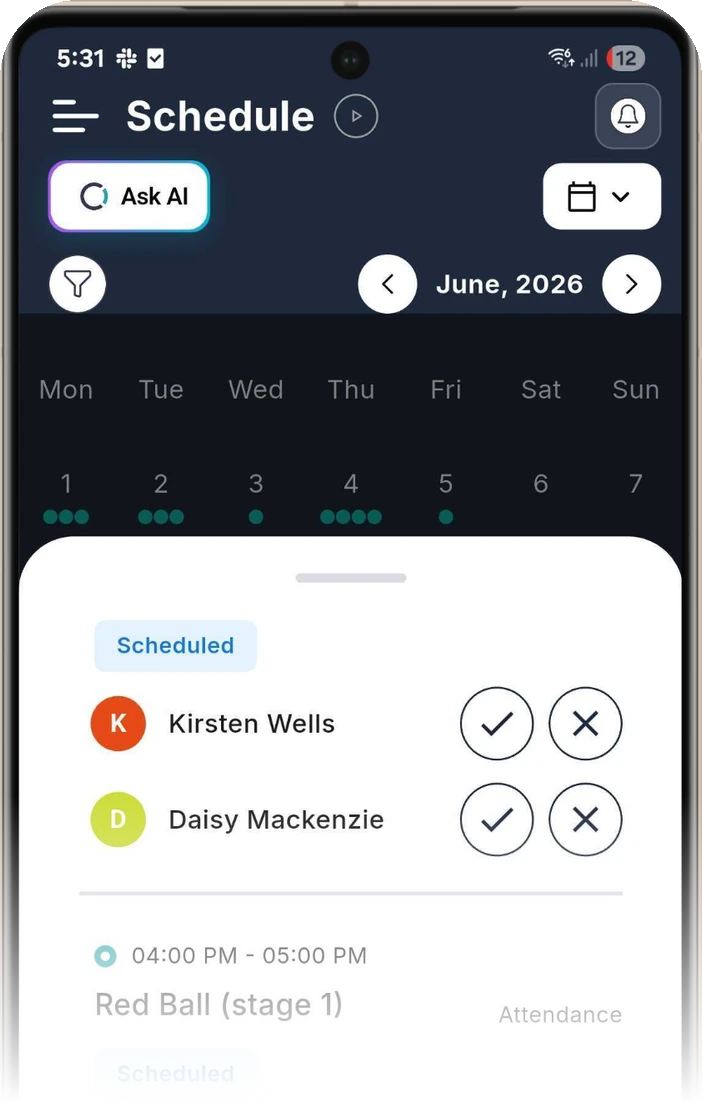
Parents report absences from the app they already use.
It’s the same app parents use to follow their child’s goals and progress. Outcoach is free on the App Store and Google Play, and once you set up your business, everyone gets the app at no cost.
Admins
Every credit and every makeup in one place, with an email the moment an absence comes in.
Coaches
Set their own availability for privates and see who’s on a makeup in every class.
Parents and students
Tap the cross to report an absence, check their credit and book a makeup.
AI employees that handle the follow-ups.
Your rules handle the credits. Outcoach’s AI employees handle the people side: catching wrong bookings, keeping families in the loop and making sure the roll gets marked.
Makeups on autopilot by the end of the week.
You don’t have to rebuild anything by hand. We’ll help you move across.
Send us your students
Share your spreadsheet and we’ll load your classes and contacts for free, even during your trial.
Set your makeup rules
Choose the notice period, credit limit and exceptions for each type of class you run.
Open makeups on your booking page
Publish your classes and coach availability, and let families rebook themselves.
Can I set up different makeup rules for private and group lessons?
Yes, absolutely. Every type of class you run can have its own makeup rules, including the notice period, the credit limit and which absence reasons earn a credit.
What does ‘statuses that bypass the credit limit’ mean?
You can set a maximum number of makeup credits per student. If a class is washed out or a coach cancels, that limit is bypassed automatically, because it’s not the family’s fault. Many of our customers use this one.
How do parents book makeups?
Through your booking page, which works anywhere on the web. Outcoach asks for their email, verifies their details and shows all their children with the credit each one has left. They pick a class or a private slot and book.
How does Outcoach know a student’s level, so they don’t book the wrong class?
Outcoach looks at the classes each student is enrolled in to work out their level. You don’t have to update a field by hand every time a student moves up.
Can I approve makeup bookings manually?
Yes. You can auto-approve makeup bookings or review each request yourself, and you can set this for each coach’s availability.
Can I set a minimum notice period for absences?
Yes. Set the minimum notice in hours on each event type. Private lessons can have a longer notice window than group classes.
Can I give or take away makeup credit by hand?
Yes. Open the student’s profile and go to the Makeup tab, or use the Make-up Credits screen to add credit or reset credits for selected members. Every change is logged in the student’s makeup allocation history.
Can private makeups be limited to the same coach or venue?
Yes. Turn on ‘same coach only’ or ‘same venue only’ for makeup bookings on any event type.
What happens to an absent student’s spot?
If you switch on ‘make absent student’s spot available’, every recorded absence opens that place up for another student, including someone booking a makeup.
How do coaches know a student is there for a makeup?
Makeup students show on the attendance roll with everyone else, with an ‘Is this a makeup?’ column, so coaches know who’s joining before class starts.
Start managing your makeups today.
Set up your makeup rules in minutes and let families rebook themselves. We’ll import your students and classes for free.