
Painting and craft class software Less admin.
More making.
Painting courses, craft workshops, kids’ sessions and private events, all booked and paid in one app. For you, your teachers and your students.
Trusted by 16,100+ students, teachers and makers
Built for every way your school teaches
Running a craft studio shouldn’t feel like a second job
You got into this to teach making, not to chase texts and payments.
“Rosa’s sick. Who’s taking her 10 am watercolour class?”
Now you’re texting 12 students, one by one.
“Who still hasn’t paid for the course?”
Bank transfers, screenshots and awkward chats at the door.
“I can’t make Thursday. Can I come Saturday instead?”
Makeups live in your head or a notebook.
“How many canvases do we need for Friday?”
Numbers live in a spreadsheet, not with your bookings.
“The workshop room is double-booked again.”
Teachers, rooms and private events fight for the same slots.
“I didn’t book the next course.”
Students finish one course and drift away. You notice too late.
Every class your studio runs, in one place
From weekly courses to one-off workshops, one system runs them all.
Painting classes
Painting courses for every level, from watercolour to oils.
Craft workshops
Pottery, sewing and craft workshops that fill themselves, with waitlists built in.
Kids’ sessions
Kids’ painting and craft sessions, with parents kept in the loop.
Events and parties
Parties, team events and paint and sip nights, booked and paid online.
Mix and match. One student, one profile, every format.
Everything your studio runs on, in one place
From grouping students to keeping them coming back.
Group students by course
Pick your beginner watercolour students and turn them into a class linked to Thursday at 6 pm. Each profile holds their courses and history.
Schedule a whole term in one go
Add a class once, repeat it for 6 weeks, then invite every student from the beginner group.
Message one student or everyone
Swap a session when a student can’t make it, or send the materials list to the whole class and see who has read it.
Get paid before the first class
Course fees, workshops, materials and private events in one list. Send a reminder with a pay link and watch it turn to Paid.
Give every student a clear goal
“Lay a flat watercolour wash.” “Throw a cylinder on the wheel.” Add goals from templates and update progress after each class. Students see it too.
Keep creating between classes
Set small tasks after each class, like a colour study. Students tick them off at home, so you know who practised.
Track skills and finished pieces
Share photos of finished pieces, track skills over time, and send teacher feedback to students.
Spot students before they drift
See what is paid and what is owed, and the students who might not come back: missed sessions, no next course booked, a pass that ran out.
From first brushstroke to confident maker, every step tracked
Set goals for every level and see who is ready to move up. Students follow along.
Beginner
First brushstrokesImprover
Colour and compositionConfident
Own style and mediaAdvanced
Exhibitions and commissionsUse your own levels, by medium or skill.
2 students are ready to move up
Techniques secure, pieces finished and regular attendance. Lucas is close; colour mixing is the only gap.
| Student | Techniques | Pieces | Attendance |
|---|---|---|---|
| MMia Chen ✓ | 12/12 | 3/3 | 100% |
| AAarav Patel ✓ | 11/12 | 3/3 | 92% |
| LLucas Nguyen | 8/12 | 3/3 | 92% |
“Mia’s washes are really even now and her landscape is nearly finished. This week: three small colour studies, ten minutes each.”
Teacher off sick? Sorted before the first class.
Tell Outcoach AI what you need in plain English. It does the admin, then shows you exactly what changed.
- 1Finds every class that teacher has today
- 2Finds a free teacher for the same class, or books a makeup
- 3Tells all 12 students by SMS and email, with the new plan
Courses, workshops and events that book themselves
One place for students to book, pay and keep up.
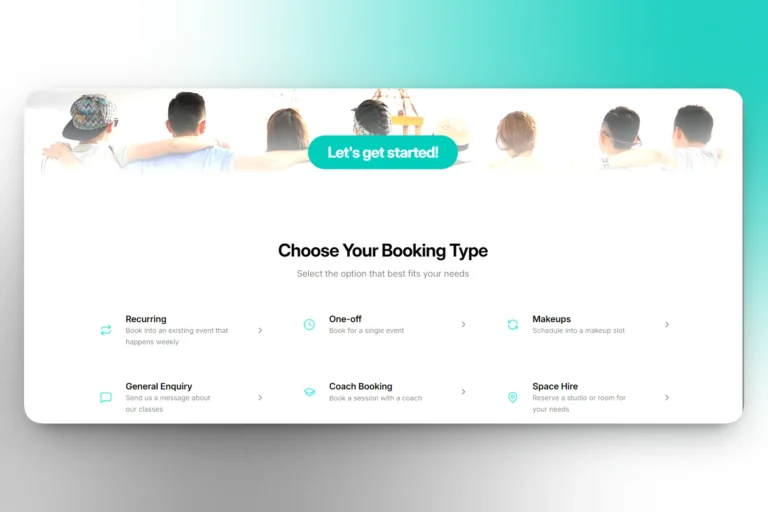
Your own booking page
Students book a course, a workshop or a private event and pay when they book.
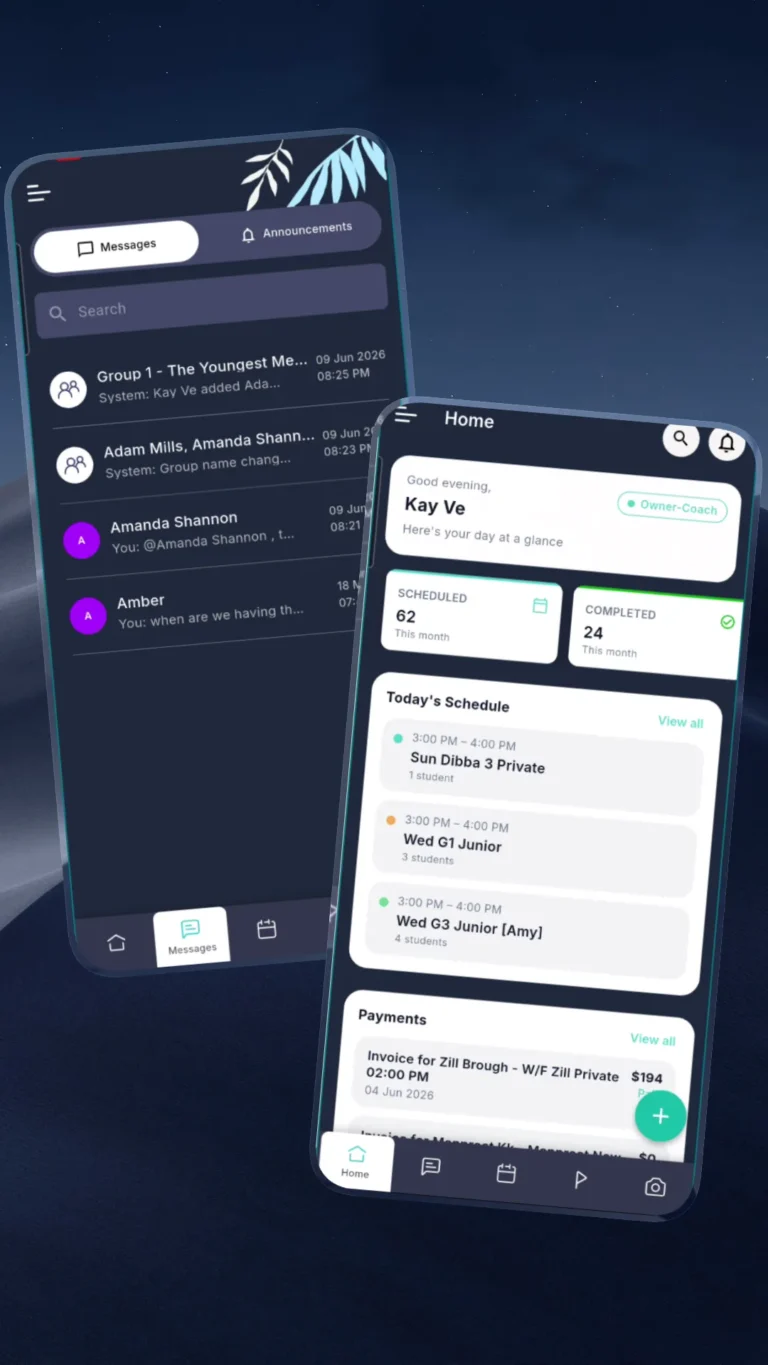
A free app for every student
Classes, tasks, payments and messages on their phone. Free for students and parents.
Rooms and teachers, sorted
Every room and teacher on one timetable, so nothing is double-booked.
Session full? Waitlist handled
When a spot opens up, the next student in line gets offered it.
Whether you teach from your kitchen table or run a busy studio
Start with one class and grow into a busy studio. Pay per student.
Independent makers
You teach, you run the business
- Your own booking page for classes and workshops
- Get paid by card, with automatic reminders
- Run everything from your phone between classes
Painting and craft studios
Many teachers, rooms and workshops
- Assign teachers and rooms to every class
- Courses, workshops and private events
- Makeups and waitlists that fill gaps for you
Community and art centres
Multiple locations and programs
- Course billing, passes and materials fees
- Progress across every course
- Multiple rooms and locations in one place
All in one platform
One login for you, your teachers and students. See what’s in each plan
- Online enrolment and trials
- Course billing
- Class passes
- Materials fees
- Sibling discounts
- Card payments and invoices
- Automated reminders
- Waitlists
- Makeup sessions
- SMS, email and in-app messages
- Attendance
- Rooms and locations
- Home practice tasks
- Goals from craft templates
- Events and parties
- Teacher feedback
- Photos of finished pieces
- Revenue and retention reports
- Outcoach AI assistant
- Free app for students and parents
It has made us more connected to the student and the parents. There’s a three-way relationship, so we communicate a lot better.
“It has completely streamlined the way we handle admin. The AI has been a standout feature.”
“It’ll help all our staff reduce their administrative load to really focus on what’s going to take our business forward.”
Billed yearly, or $0.99 paid monthly. No setup costs, no hidden fees. Cancel anytime.
Questions painting and craft studios ask us
Can’t see yours? Talk to our team and we’ll show you how it fits your studio.
What is Outcoach?
Does it handle courses, workshops and one-off events?
How do makeup classes work?
Can I bill by the term or the course?
Can I track skills and finished pieces?
What happens when a teacher is sick?
Can students book workshops online?
Can I manage teachers, rooms and locations?
Do students and parents get an app?
Can I run private events and parties?
Is Outcoach only for big painting and craft studios?
How much does Outcoach cost for a painting or craft studio?
How do I get started?
Spend more time making
Set up your first class today. Your students and families will notice the difference straight away.